


The popularity of employee monitoring software continues to climb. 78% of employers now use some form of employee monitoring, up from 60% before the pandemic, and among remote-first companies adoption reaches 96%, compared with 65% of fully in-office teams. The market itself reflects this trend: it reached $3.89 billion in 2026 and is projected to grow to $4.59 billion in 2026, with the market on pace to reach $8.29 billion by 2030.
This growth is often tied to measurable business outcomes. The American Management Association found that companies implementing transparent monitoring practices saw a 22% improvement in worker productivity, and separately, 81% of organizations report increased output after deploying monitoring tools. Monitoring software can record and analyze employee activity and help identify and address productivity issues. As a result, employers can manage these issues early and reduce costs associated with lost productivity, employee turnover, and legal liabilities.
Collected productivity data can reveal knowledge gaps, allowing the creation of targeted training and development programs.
Finally, monitoring employee computer activity can help detect and prevent security threats, such as unauthorized access or data breaches.
The advantages of monitoring employee computers are hard to underestimate: addressing productivity and security issues is vital for companies of all sizes. While larger companies have more resources to choose a suitable solution, small businesses often cannot afford employee monitoring software due to high license and operational costs and complex implementation.
That said, free plans vary a lot in what they actually offer. Some cover the basics well enough for a small team, while others limit you to a single device or a short trial before the more useful features — screenshots, detailed reports, alerts — require a paid plan. It's worth checking what's included before choosing a tool, so there are no surprises once your team grows.
This article reviews five free or affordable tools for monitoring employee activity on computers suitable for small businesses.
CleverControl
CleverControl then analyses the collected data and presents productivity statistics: work time, application, web and social media usage dynamics, top-used sites and apps, and more.
Take Control of Workplace Productivity
Start monitoring your team today with CleverControl.
You can receive data reports on your online dashboard, which you can download for offline viewing. Additionally, you can schedule daily, weekly, or monthly reports by email.
CleverControl is perfect for small businesses as its one solution combines comprehensive employee monitoring, time tracking, and basic data protection functionality. Thanks to this, companies can get an all-in-one tracking solution, cut costs on software, and forward precious resources to growth and development.
The solution offers a trial, affordable prices, starting from $6.20 per PC/month, and discounts.
Advantages
- Offline time-tracking
- Supports Windows, macOS
- Multiple administrator subaccounts with different permission levels
Disadvantages
- No integrations with project management and budgeting software
ActivTrak
ActivTrak has flexible settings, allowing you to manually categorize activities as productive/unproductive, and set productivity goals and schedules to avoid monitoring outside work hours.
ActivTrak is free for up to three users; however, its features are limited to time, apps, and website activity monitoring. If you want to track employee productivity and receive full insights, you can choose from several plans starting from $10 per user/month.
Advantages
- In-depth AI-based productivity analysis
- Integrations with third-party business and calendar apps
- Delivers measurable ROI in a few weeks
- Focus on employee privacy and gathered data security
Disadvantages
- The interface and statistics are complicated and confusing for many users
- Does not provide detailed reports of user actions, leaving room for employees to fake activity
WorkTime
WorkTime is an employee computer monitoring software with time and productivity tracking features. It can record login and logout times, monitor attendance with a breakdown into remote and in-office work, track active/idle time and overtime hours, and even has an attendance leaderboard! These features help reveal habitual latecomers and early leavers, detect and prevent overtime fraud, and maintain office discipline.
WorkTime has basic employee productivity monitoring functionality. It records all used applications and visited websites, categorizing them as productive or unproductive, and provides a productivity report that updates in real time. Other reports list the most used social networks, URLs, and employees who spend the most time online with the duration of use. Internet usage reports can show statistics by employee, department, or the entire company.
Monitoring time spent on online meetings is an interesting feature that provides insights into how much work time they take and how they affect productivity. As a result, you may optimize meeting practices, removing the unnecessary calls and making the necessary ones more effective.
The free version of WorkTime is available for up to three employees. This version offers limited reports on apps and web usage, logs, and activity summaries. The data is stored for two weeks, and only one admin can access it. More features are available in Basic, Premium, and Enterprise plans, starting from $6.99 per employee/month.
Advantages
- Time, productivity, and attendance statistics with leaderboards
- Site blocker
- Detects employees who browse job sites
- Distraction score
Disadvantages
- Interface design could be improved
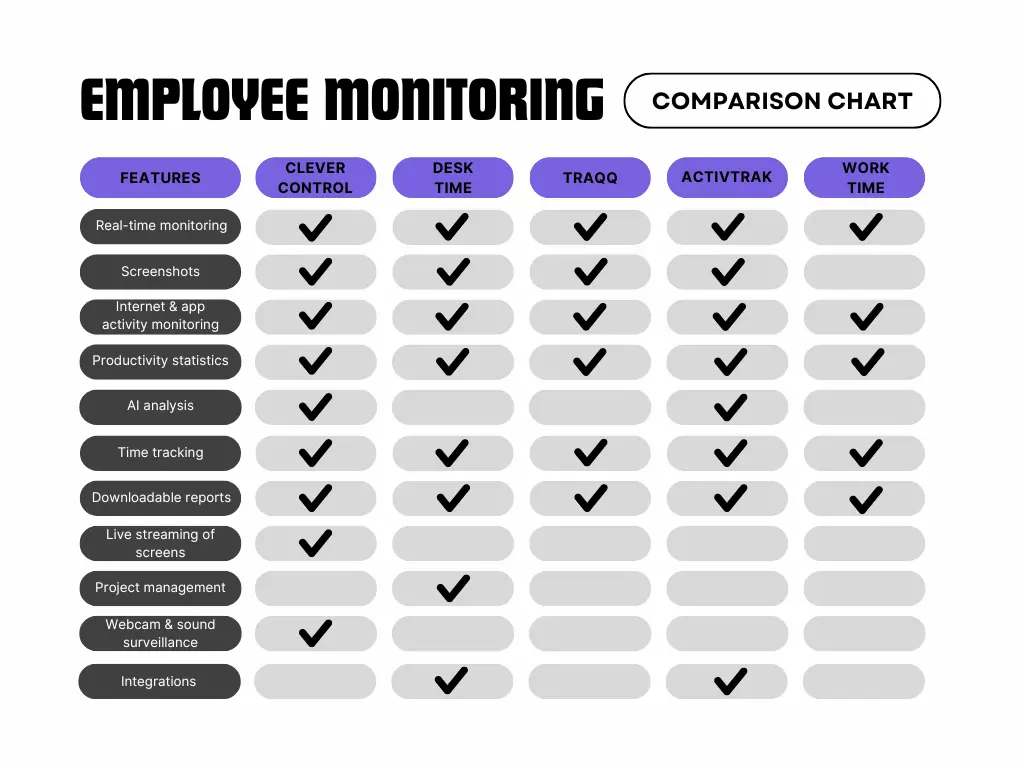
Final Thoughts
Monitoring employee computer activity can not only boost productivity but also see where work time goes. Analyzing how the staff allocates their work time, revealing distractions and ineffective resource usage helps small businesses build efficient processes, experiment with workflows, and choose the best patterns.
Employee monitoring brings the most value when it is implemented openly and transparently. The team should know what information is collected and why. The productivity reports should be used to support employees, reveal their weak spots, and advise how to improve, not to punish them. These simple practices will help avoid unnecessary stress, trust, and privacy issues.