
최고의 직원 모니터링 소프트웨어와 직원 모니터링에 대해 알아야 할 모든 것

직원 모니터링 소프트웨어는 직원의 컴퓨터 사용 활동을 추적하고 분석하는 시스템입니다. 2000년대 초 컴퓨터 기술의 발전과 함께 꾸준히 증가해 왔으며, 2020년대 코로나19 팬데믹으로 인해 인기가 급증했습니다. 최근 Instant Office의 연구에 따르면, 현재 고용주의 78%가 다양한 도구를 사용하여 직원을 추적하고 있습니다.
일반적으로 직원 모니터링 소프트웨어는 직원이 자신의 기기에 설치하는 에이전트와 관리자가 로그 및 보고서를 받을 수 있는 모니터링 대시보드로 구성됩니다.
직원 모니터링 소프트웨어는 보이지 않는 전지전능한 관리자와 같습니다. 키 입력부터 방문한 웹사이트까지, 근무 시간 동안 직원이 컴퓨터에서 하는 거의 모든 활동에 대한 정보를 수집합니다. 더욱 발전된 직원 모니터링 소프트웨어는 단순한 데이터 수집을 넘어, 각 직원의 생산성 및 급여 계산에 대한 보고서를 바로 제공하여 관리자의 시간을 절약해 줍니다.
이러한 종류의 소프트웨어의 가장 명백한 목적은 직원들의 생산성을 모니터링하는 것입니다. 직원들이 프로젝트에 얼마나 많은 시간을 투자하고, 유튜브에서 웃긴 고양이 영상을 보는 데는 얼마나 많은 시간을 쓰는지, 업무 과정에 참여하고 있는지 아니면 10분마다 커피 브레이크를 갖고 있는지, 업무 관련 정보를 검색하는지 아니면 주말에 라스베가스 여행 티켓을 싸게 예매하는지 등을 파악하는 것이죠. 직원 모니터링 앱은 바로 이러한 질문들에 대한 답을 찾도록 설계되었습니다.
직원 모니터링 소프트웨어는 게으름을 피우는 직원을 찾아내는 것 외에도, 눈에 잘 띄지 않지만 매우 중요한 여러 가지 목적을 달성할 수 있습니다. 우선, 어려움을 겪는 직원을 파악하는 데 도움이 됩니다. 과중한 업무량이나 경험 부족으로 힘들어하는 신입 직원들은 관리자에게 어려움을 털어놓기를 주저할 수 있습니다. 이러한 문제를 파악하고 해결하기 위해 노력하는 것은 생산성 향상뿐 아니라 사무실 분위기를 개선하고 관리자로서의 이미지를 높이는 데에도 기여할 것입니다.
직원 모니터링 소프트웨어를 사용해 볼 만한 또 다른 숨겨진 이유는 바로 회사 자원 관리입니다. 최근 프린터 용지 비용이 증가했나요? 직원들이 사용하지 않는 소프트웨어에 돈을 낭비하고 있지는 않나요? 보고서를 통해 확인해 보세요. 직원들이 특정 프로그램을 얼마나 자주 사용하는지, 또는 개인적인 용도로 사무용 프린터를 사용하는지 등을 알 수 있습니다.
최첨단 직원 모니터링 소프트웨어는 데이터 보호 모듈을 탑재하고 있습니다. 이 모듈은 기밀 정보에 대한 접근, 복사 또는 전송을 차단하고, 의심스러운 상황이 발생하면 관리자에게 경고합니다. 이처럼 완벽한 보안 시스템을 통해 데이터 유출이나 기업 데이터에 대한 무단 접근을 걱정할 필요가 없습니다.
이는 직원 모니터링 도구가 해결할 수 있는 문제 중 일부에 불과합니다. 이 주제를 더 자세히 살펴보고 해당 분야의 주요 솔루션에 대해 알아보겠습니다.
직원 모니터링 소프트웨어의 종류
직원 모니터링 소프트웨어는 시간 추적, 활동 모니터링 및 데이터 손실 방지(DLP)의 세 가지 유형으로 나뉩니다.
출결 관리, 시간 추적, 급여 계산과 같은 일상적인 프로세스를 자동화하려면 시간 추적 앱이 필수적입니다. 이러한 앱은 로그인 및 로그아웃 시간, 직원의 비활동 시간, 각 작업에 소요된 시간을 기록합니다. 이를 통해 직원이 프로젝트에 투입하는 시간과 특정 업무를 누가 언제 담당했는지 추정할 수 있습니다. 계약직이나 시간당 급여 방식으로 고객에게 청구하는 경우 정확한 추적 데이터는 매우 중요합니다. 가장 큰 장점은 보고서가 실시간으로 자동 생성되어 부정행위나 인적 오류의 위험을 없애준다는 것입니다. 시간 추적 앱은 생산성 향상, 직원 동기 부여, 비용 지출 내역 파악 등 다양한 이점을 제공합니다.
활동 모니터링 소프트웨어는 시간 관리 프로그램과 유사하지만 훨씬 강력한 기능을 제공합니다. 직원이 사무실 컴퓨터에서 하는 거의 모든 활동을 기록할 수 있기 때문에 '직원 감시의 빅 브라더'라고 불러도 무방할 정도입니다. 일반적으로 이러한 시스템은 키 입력 및 클립보드 기록을 남기고, 스크린샷을 찍고, 사용자의 인터넷 활동(소셜 네트워크 방문 및 채팅 포함)과 활동/비활동 시간을 추적합니다. 프린터나 USB 메모리 같은 외부 장치도 모니터링할 수 있습니다. 최고급 모니터링 프로그램은 직원들의 화면과 웹캠에서 실시간으로 영상을 스트리밍하여 직원들을 관찰할 수 있도록 해줍니다. 근무 시간 중에 스트리밍 영상을 확인할 시간이 부족한 경우, 프로그램이 영상을 녹화하여 나중에 시청할 수 있도록 해줍니다. 이 소프트웨어는 수집된 데이터를 보기 쉬운 차트와 그래프로 분석하여 제공합니다. 하루가 끝나면 각 직원, 부서 또는 전체 사무실에 대한 포괄적인 활동 보고서를 받아볼 수 있습니다.
The range of application of these reports is immense. They provide valuable insights on the productivity and involvement levels, help to discover ineffective work patterns and underperforming employees, save company recourses and more. If implemented carefully and ethically, activity tracking software can become a reliable partner in growing your business.
데이터 손실 방지(DLP)는 가장 복잡한 유형의 직원 모니터링 소프트웨어입니다. DLP는 사용 중이거나 전송 중이거나 저장된 데이터를 모니터링, 탐지 및 차단하여 잠재적인 데이터 유출 및 기타 위협을 감지합니다. 즉, 이메일이나 메신저를 통해 전송된 데이터, 직원이 개인 기기에서 사용 중인 데이터, 또는 회사 서버에 저장된 데이터에 대한 내용 검사 및 문맥 분석을 수행합니다. DLP 소프트웨어는 정확한 데이터 일치, 정확하거나 부분적인 파일 일치, 규칙 기반 분석, 범주 분석 등 여러 정교한 분석 기법을 통합합니다. 정확한 데이터 일치란 프로그램이 데이터베이스 덤프 또는 실제 데이터베이스에서 정확히 일치하는 항목을 검색하는 것을 의미합니다. 파일 일치의 경우, 소프트웨어는 파일 내용을 분석하지 않고 파일의 해시값을 정확한 지문과 비교합니다. 규칙 기반 분석은 가장 일반적인 기법입니다. 프로그램은 카드 번호나 보안 번호와 같이 미리 구성된 규칙에 따라 데이터를 검사합니다. 사전 구축된 범주 분석은 유사한 방법입니다. DLP 시스템은 은행 정보, 사회 보장 번호 등과 같은 일반적인 유형의 민감한 데이터를 검색합니다. 위에서 설명한 방법들은 범주화에 크게 의존하지만, 위반 사항이 이러한 범주에 속하지 않는 경우는 어떻게 해야 할까요? 최신 DLP 시스템은 어휘 분석, 머신 러닝, 통계 분석과 같은 더욱 정교한 기술을 사용하여 이러한 위반 사항을 탐지하고 방지합니다.
기업은 데이터 유출, 정보 유출, 손실, 누출 또는 파괴와 같은 민감한 정보의 손상을 방지하기 위해 DLP 시스템을 사용합니다. DLP는 또한 기업이 관련 규정을 준수하고 개인 식별 정보(PII)를 보호하는 데에도 도움이 됩니다.
이 글에서는 주로 활동 추적 소프트웨어에 대해 살펴보겠습니다.
Features of Employee Monitoring Software
Despite the large selection of activity monitoring software on the market, many features are typical for most of them. Let's have a look at the functionality that you can expect from a decent employee monitoring app:
키로깅. Recording keystrokes is one of the most controversial features. Keylogging reports will demonstrate if the employee works on the project, chats with a friend on WhatsApp or - worse - gives away corporate secrets to competitors. On the other hand, the keylogger can accidentally record sensitive information such as passwords, bank details or personal conversations. Flexible monitoring solutions have the option to disable keylogging.
스크린샷. The app takes snaps of the computer screen at regular intervals of time or by the trigger. This feature is great if you want to know what your employee does at any given moment or have proof that they are involved in unwanted activity.
웹 활동 모니터링. It implies tracking visited websites, social networks and search queries and how much time the user spends there. Web activity monitoring comes in handy not only in terms of productivity (visited productive/unproductive sites rate) but in terms of training. If you see that an employee visits a lot of work-related sites on a specific subject/skill, they may need training in that skill or field. In this case, providing training will boost productivity drastically.
애플리케이션 모니터링. This feature kit will show what apps are installed on the monitored device, which apps are running and how much time the user spends using them. In addition to productivity assessment, tracking applications may serve as a means to analyze if your team is over- or under-licensed. Besides, you will know if the employee installs any unwanted software on the company-owned device.
애플리케이션 차단기. Like the site blocker, the application blocker eliminates distractions in the workplace. You can block messaging apps, games or other unwanted apps if you feel they affect the team's productivity.
파일 작업 추적 gives you the complete list of operations with files, such as creation, copying, sending via email, printing and deletion. It is an effective way to monitor how sensitive information is processed.
휴대용 데이터 저장 장치 추적. Employees frequently leak information by copying it to a flash drive or sending it out by email outside the corporate network. That is why monitoring external data storage devices is a great way to ensure that important data is not transferred outside the company.
이메일 모니터링 is another efficient tool to minimize the risk of data leakages. It can also serve for quality assessment, for example, if you monitor support agents or other employees working with customers.
프린터 제어 serves two purposes. First, it helps you calculate and optimize expenses on office supplies and discover employees who may use office equipment for off-work purposes. Second, printing out confidential information is a widespread method of leaking data. With monitoring logs on your hands, you will always know if any leakages happen and who is the culprit.
화면 실시간 스트리밍 allows you to see the employee's screen as if you sit in front of it. This way, you can check what any worker in your office (or everyone at once) does at the moment. Some apps can boast of screen recording features, so you can go back and re-watch any minute of the work day.
웹캠과 마이크를 통한 모니터링. If office computers have webcams and microphones, a top-notch employee monitoring app can stream video and sound from them in real-time or make recordings. These features may contribute both to productivity and overall office security, such as preventing inappropriate behaviour, thefts or access to confidential information.
생산성 보고서. Collecting activity data is only half of the story - you have to analyze it to determine the productivity level and steps to improve it. Luckily, the system will do the calculations for you, and you will have neat charts and graphs by employee, department or the whole team on your hands in a blink of an eye.
원격 모니터링 및 구성. You do not need to access the employee's computer to get updates on their productivity and actions or adjust monitoring settings. Modern systems can deliver logs in various ways. For example, you can get regular auto-generated reports by email, FTP or file sharing platforms (e.g. Google Drive or Dropbox). These ways have some limitations, though, as they do not allow real-time monitoring of the screen or webcam. Most modern apps deliver data to online dashboards that offer much more than viewing raw data. They generate statistic reports, stream screens or webcams in real-time and allow to adjust settings of the program remotely.
This is an overview of the most popular features you can get in an employee monitoring solution, but the list is not complete. Some apps may have in-built payroll calculators, geolocation tracking, suspicious behaviour analysis modules, hidden mode and more.Feature range may vary from one program to another depending on what purposes it serves. For example, programs focusing on data leakage prevention will include more features for tracking user and file activity and access restrictions. Those for productivity monitoring will offer time tracking and project management functionality. When choosing a solution for your company, we recommend first determining the goal of monitoring and look for a program that has the required features to achieve it.
How to Choose the Best Employee Monitoring Software
When you decide to track your staff's performance, you will start with looking for employee monitoring software. A couple of Google searches, and you suddenly find yourself amid an endless sea of offers where it is so easy to get lost. Each solution will try to convince you it is the best, has the richest functionality and boosts your team's productivity by 10000%. So, how do you navigate through this sea and find the most efficient tool for your business?
Below are some points to consider before you commit to one or another employee monitoring solution.
Purpose of monitoring
Ask yourself what you want to achieve by monitoring your employees. Do you want to discover slackers and inefficient work processes? Or perhaps, your goal is to replace an outdated payroll system with a modern automated one? Maybe, you strive to minimize the risks of insider threats and data leakages?
Each employee monitoring software is designed for a fixed purpose or combines several related ones: data leakage protection, productivity tracking, attendance control, etc. So, when you define a clear goal of monitoring, you will immediately discard solutions that do not match your requirements.
특징
The next step is to look closer at the features the tools offer. Some apps will have only a handful of basic options, such as screenshots, keylogging and internet activity monitoring. Other top-notch systems will seem to log every mouse click and every move the employee makes around the computer. It is natural to assume that the more - the better, but do not rush for the most fully-featured app you can find. You may end up overpaying for the functionality you will never use. Instead of wasting money and time, think of what features will bring you the most valuable insight and go for the tool that offers what you need.
User-friendly experience and adaptability
Whether you are running a small startup or a large company, the last thing you want is to waste time on complicated installation process and baffling interfaces. A good employee monitoring system should be easy to roll out across all office computers - even if you are not tech-savvy and do not have a staff IT specialist.
Additionally, the best monitoring programs have an intuitive interface and clear data visualization, for example, colourful charts and graphs. You should be able to navigate quickly and efficiently without puzzling over what that chart means and where you find a productivity report.
Finally, employee monitoring should be scalable and adaptable. Adding or removing an employee from the system must not be painstaking and time-consuming. Flexible settings are also a great advantage since you can adjust them individually for each employee, enabling and disabling monitoring features anytime.
It is hard to understand if the monitoring system is as user-friendly and adaptable as it promises until you try it. Luckily, many services offer free fully functional trials, so you can test how the program works in your environment. In case you do not want to waste time on testing, you can always book a demo. An experienced representative will highlight the main advantages of their solution and let you see how it can benefit your business in practice.
High level of security
Employee monitoring software collect and store large amounts of information, including confidential data. For instance, the keylogger may capture an important password, or a piece of sensitive information may be saved in a screenshot. Before committing to any employee monitoring software, ensure that it makes secure storage of collected data the top priority. You can contact a company representative and inquire if the data is transferred and stored in an encrypted form, who has access to it and other matters you are concerned about.
Multi-platform compatibility
One of your employees works on a Mac, another one - on Windows, and the third one uses their iPhone for work most of the time. Choose an employee monitoring software that supports multiple platforms to save on licenses. Many systems offer multi-platform subscriptions meaning that one subscription is suitable for all supported platforms. Or you can check out bundle offers. They usually come at a lower price than separate licenses for each operating system.
Support and assistance
However reliable, user-friendly and easy-to-use the software you choose, no one is safe from a bump or two along the way. Ensure that the developer company offers technical assistance and support by phone or email. Also, check if license terms include free technical assistance. Otherway, you may have to pay extra if you need help with the program or, in the worst-case scenario, may not get any support at all.
직원들의 업무 진행 상황과 생산성을 모니터링하는 것은 회사 성장에 필수적입니다. 현명하게 선택된 직원 모니터링 시스템은 이러한 과정을 간편하고 효율적으로 만들어 줄 것입니다. 위에서 제시된 조언들이 귀사에 가장 적합한 도구를 선택하는 데 도움이 되기를 바랍니다.
Employee Monitoring Software Pricing
가변 가격 구조는 일반적으로 고급 기능을 잠재적으로 더 낮은 가격으로 제공하는 것을 주된 목표로 합니다. 소프트웨어의 경우 기업이 선택할 수 있는 다양한 가격 모델이 있습니다. 기본적으로 가격은 다음과 같은 여러 요소를 기반으로 합니다.
플랫폼: Is the solution web-based, or does it need to be installed on a particular device?
결제 주기: Does the software run on subscriptions, or does the organisation carry out a one-time transaction?
운영 체제: Does the solution support both desktop (Windows, MacOS, Linux) and mobile (Android, iOS) operating systems?
특징: Does the software come with built-in feature sets, or do customers need to purchase extra add-ons/upgrades to expand their monitoring capabilities?
사용자 라이선스: Does the solution support single or multi-user functionality?
할인: How will the organisation benefit from any existing discounts as part of a package or bundle?
Factors like these typically determine the pricing structure of each software package. Just to put a number to it, the average cost of a robust employee monitoring solution could be somewhere around US$90 a year for a single-user license. But, as we said, this number can be influenced by all sorts of factors.
예를 들어, 일부 솔루션은 엔드포인트 보안과 모니터링 기능을 함께 제공할 수 있습니다. 또 다른 솔루션은 데스크톱과 모바일에서 모두 뛰어난 기능을 제공할 수 있습니다. 본질적으로, 모든 것은 조직이 직원 모니터링을 통해 달성하고자 하는 목표에 달려 있습니다. 예를 들어, 사이버 괴롭힘을 방지하기 위해 특정 채널에서 직원들의 소셜 미디어 활동을 모니터링하려는 조직을 들 수 있습니다.
반대로, 어떤 조직은 업무용 이메일을 중심으로 모든 네트워크에서 직원의 이메일 활동을 모니터링해야 할 수도 있습니다. 따라서 모니터링의 사용 빈도와 유형은 가격에 큰 영향을 미치는 요소 중 하나입니다.
사무실 및 원격 근무자를 위한 상위 20가지 모니터링 소프트웨어
1. CleverControl
CleverControl은 탁월한 업무 환경 모니터링 기능을 제공합니다. 이 도구는 안전한 웹 계정을 통해 실시간 모니터링을 지원하고, 키로깅 제어, 스크린샷 촬영, 인쇄 활동 관리, 인스턴트 메시징(IM) 관련 활동 모니터링, 인터넷 사용 내역 확인, 통화 녹음을 위한 오디오/비디오 제어 등의 기능을 제공합니다.
What stands out about CleverControl 이 서비스의 가장 큰 장점은 대상 컴퓨터의 화면을 끊김 없이 녹화할 수 있다는 것입니다. 고용주는 하루 종일 실시간으로 화면 활동을 녹화하고 언제 어디서든 원하는 방식으로 시청할 수 있습니다. 또한 웹캠을 활용하여 오디오/비디오를 녹화하고, 필요시 구체적인 증거를 확보하여 주장을 뒷받침할 수 있습니다. 게다가 이러한 서비스는 클라우드 기반으로 제공되므로 고용주는 추가 장비 구매 없이도 앞서 언급한 모든 이점을 원격으로 누릴 수 있습니다.
가격
Windows 및 macOS용 - 월 1PC당 $4.70부터
2. Spyrix Employee Monitoring
Compatible with both Windows and Mac, Spyrix 이 솔루션은 시중에서 가장 포괄적인 클라우드 기반 직원 모니터링 솔루션 중 하나입니다. 시간 관리, 녹화, 비공개 운영, 인증 및 원격 모니터링 기능을 갖추고 있습니다. 기업은 이 프로그램을 사용하여 화면 활동, 키 입력, Skype 및 Slack 통화 및 채팅, 소셜 미디어 활동 등을 모니터링할 수 있습니다.
Besides these, Spyrix helps block and filter URLs notify employers on a specified list of "keywords," and visualize the productivity hours (data) to elucidate the performance better. Indeed, Spyrix offers a wide range of employee monitoring features excellently supporting day-to-day business activities.
가격
Windows/macOS용 - 5대 PC 기준 연간 $199부터
3. Actual Keylogger
Actual Keylogger는 기기 감시에 매우 유용한 도구입니다. 키 입력 기록 관리부터 소셜 미디어 활동 모니터링까지 다양한 용도로 완벽하게 작동합니다. 실행된 애플리케이션, 방문한 웹사이트, 입력한 키와 비밀번호, 인터넷 연결 등을 모두 모니터링할 수 있습니다.
이 도구는 비밀번호로 보호되는 잠금 장치를 갖추고 있어 은밀한 작전을 신속하게 수행할 수 있도록 도와줍니다. 포괄적인 기능 덕분에 Actual Keylogger 시스템 관리자, 개인 사용자, CEO, 심지어 부모에게까지 완벽하게 적합합니다.
가격
Windows용 - 1대 기준 $69부터
MacOS용 - 1대 기준 $79부터
4. REFOG
기업과 가정 모두에 이상적인 모니터링 소프트웨어로 널리 알려진 REFOG는 201개국 500만 명의 사용자를 만족시키는 사용자 친화적인 솔루션입니다. 이 프로그램은 인사 담당자에게 적합하며, 자동 또는 수동 키로거를 관리하고, 특정 직원을 감시하고, 전체 네트워크를 스캔하고, 다른 사용자의 활동을 모니터링할 수 있습니다.
REFOG는 표준 모니터링 기능 외에도 기업 정책을 시행하고 직원의 인터넷 활동을 해당 정책과 대조하여 확인할 수 있는 기능을 제공합니다. 따라서 관리자는 잠재적인 보안 침해를 인지할 수 있습니다.
가격
Windows용 - 6대 PC 기준 $240부터
5. Teramind
시중에서 가장 강력한 모니터링 소프트웨어 중 하나인 테라민드는 탁월한 감시 기능을 제공하며 은행, 핀테크, 정부, 의료, 교육, 소매 및 공공 서비스 산업에서 널리 사용되고 있습니다.
이 회사의 직원 모니터링 프로그램은 보안 및 규정 준수 보장에 중점을 두고 있습니다. 예를 들어, 원격 측정 데이터를 강화하고 위협 탐지 기능을 구성하여 연결된 장치의 모든 변경 사항을 적극적으로 추적합니다. 또한, 이 프로그램은 GDPR, PCI DSS 및 HIPAA 템플릿을 통합하여 대상 장치의 규정 준수 여부를 모니터링하는 데 도움을 줍니다.
가격
월 5석 기준 69달러부터 시작합니다.
6. Hubstaff
Hubstaff의 직관적인 대시보드, 생산성 모니터링 기능, 성과 측정 기능 등은 고용주에게 큰 만족감을 선사합니다. 이 앱은 전반적인 업무 흐름과 성과에 대한 실시간 정보를 제공하여 관리자와 인사 담당자가 적절한 조치를 취할 수 있도록 지원합니다.
긍정적인 측면으로, Hubstaff는 직원들의 정신 건강과 복지를 중시하며, 이를 위해 직원이 근무 중일 때만 모니터링 솔루션이 활성화되도록 소프트웨어를 설계했습니다. 또한 직원들이 데이터 관리를 직접 담당할 수 있도록 함으로써 고용주의 부담을 줄이고 건강한 일과 삶의 균형을 유지할 수 있도록 지원합니다.
가격
PC 한 대당 월 5.83달러부터 시작합니다.
7. Insightful (Formerly Workpuls)
Insightful은 이름에서 알 수 있듯이 생산성 추적, 실시간 모니터링, 근태 관리, 시간 기록, 보고서 작성 등을 통해 원활한 모니터링 경험을 제공합니다. 실제로 이 도구는 많은 주요 기업에서 최고 수준으로 평가받고 있으며, GetApp과 Capterra에서 4.8점의 높은 평점을 기록했습니다.
Insightful은 Windows, MacOS 및 Linux와 호환되며 클라우드 솔루션과 온프레미스 소프트웨어 두 가지 버전으로 구매할 수 있습니다. 클라우드 솔루션을 사용하면 기업은 기기에 아무것도 설치하지 않고도 직원 PC를 원격으로 모니터링하고 관리할 수 있습니다. 이는 기술 장비 및 저장 시설에 투자하고 싶지 않은 중소기업에 이상적입니다.
가격
PC 한 대당 월 6.40달러부터 시작합니다.
8. ActivTrak
Branded as a "workforce analytics" tool, ActivTrak facilitates a plethora of workplace monitoring solutions. These include, and are not limited to, productivity management, work pattern identification, compliance & risk management, burnout prevention, SaaS management, time tracking, employee web activity tracking and reporting, etc.
Trusted by 9000+ organizations, ActivTrak is one of the most demanded monitoring solutions in the world. Much of that can be attributed to the knowledge base it contributes to by identifying patterns that "fuel success." With this knowledge, it is relatively straightforward for the tool to predict employee behaviour and collaborate with talent management leaders to facilitate interventions.
가격
PC 한 대당 월 10달러부터 시작합니다.
9. CurrentWare
이 목록에서 비교적 간소한 도구인 CurrentWare는 직원 모니터링 제품군을 제공하며, 각 모듈은 특정 목표를 가지고 있어 고용주가 직원의 활동을 모니터링하고 성과 평가를 지원할 수 있도록 합니다.
For instance, the suite constitutes BrowseReporter, BrowseControl, AccessPatrol and enPowerManager. BrowseReporter tracks the employee's browsing history and delivers data for a more structured performance review. BrowseControl, on the other hand, provides a centralized access control system that enables administrators to regulate Internet usage. enPowerManager, in particular, is a unique feature which lets system administrators "shut down" or "boot" the targeted device from a remote location.
가격
PC 한 대당 월 6달러부터 시작합니다.
10. Veriato
"Productivity, Security, & Compliance Made Simple," reads the Veriato slogan. And that is just what the tool provides — a simple, easy-to-use, and affordable monitoring tool that focuses on assessing social media activity, IM activity, email activity, file downloads and movement, web activity, network connections built, keystrokes typed, applications usage patterns, and more.
Veriato는 애플리케이션 사용 시간 보고, 비디오 화면 검토 기능, 키워드 및 이벤트 알림 기능 등을 제공하여 모든 사용자 데이터를 체계적으로 관리하는 중앙 정보 허브 역할을 합니다. 고용주 입장에서는 번거로운 문서 작업과 권한 확인 절차를 줄일 수 있다는 장점이 있습니다.
가격
월 사용자당 15달러부터 시작합니다.
11. Interguard
Interguard는 다양한 운영 체제(Windows, MacOS, Android, iOS, Chrome 등)와 호환되는 원격 모니터링 소프트웨어로, 직원 생산성 평가, 내부자 위협 방지, 규정 준수 감사 및 웹 필터링/차단에 특화되어 있습니다.
이처럼 이 도구는 직원의 온라인 활동 및 성과를 체계적으로 보여주는 종합적인 보고서를 생성할 수 있도록 지원합니다. Teramind와 마찬가지로, 고용주는 이 도구를 통해 HIPAA 및 CIPA와 같은 규정을 통합하고 실시간으로 준수 여부를 모니터링할 수 있습니다. 이러한 다양한 활용성 덕분에 이 도구는 고용주에게 매우 유용하며, PCMag 및 Inc.와 같은 매체에서 수상 경력을 자랑합니다.
가격
클라우드 호스팅 버전은 PC당 월 9.99달러부터 시작합니다.
12. Time Doctor
타임닥터는 관리자, 직원, 그리고 조직 모두가 재택근무 및 하이브리드 근무 환경을 최대한 활용할 수 있도록 지원합니다. 관리자는 타임닥터를 통해 원격 근무 직원의 생산성을 추적하고 모니터링하여, 생산성 패턴을 분석하고 필요한 조치를 취할 수 있습니다.
실제로 이 도구는 원격, 하이브리드 및 아웃소싱 근무 환경에 특화된 분석 기능을 제공합니다. 따라서 다양한 조직 구조와 지역에 걸쳐 프로젝트 관리에 매우 유용하게 활용될 수 있습니다.
가격
PC 한 대당 월 6.67달러부터 시작합니다.
13. Monday.com
Monday.com은 아마도 목록에서 그리고 시장에서 가장 인기 있는 프로젝트 관리 소프트웨어일 것입니다. 이 소프트웨어는 사용자가 업무를 효과적으로 구성하고 팀 및 부서 간 협업을 할 수 있도록 필요한 모든 기능을 제공하며, 특히 원격 환경에서 유용합니다.
이 시스템은 CRM(고객 관계 관리) 시스템처럼 작동하여 사용자가 프로젝트를 생성 및 관리하고, 작업을 할당하고, 기능을 설정하여 다른 팀과 대화를 시작할 수 있도록 합니다. 이러한 협업 제어 기능을 통해 고용주는 조직 전체를 360도 조망하고, 생산성 패턴을 파악하고, 우수 인재를 채용하고, 온보딩 및 교육 프로세스를 간소화하고, 원격 근무 환경을 최대한 활용할 수 있습니다.
가격
PC 한 대당 월 9달러부터 시작합니다.
14. StaffCop
StaffCop specializes in user behaviour analytics, courtesy of the emphasis on detecting anomalies in application usage patterns, deviations in communication patterns and changes in computing patterns. With this, business owners can have a bird's-eye view of the user activity and detect any potential risks or threats emanating from "change."
Lately, StaffCop has come up with remote administration that features remote desktop control, software installation reports, and comprehensive network monitoring. These features make it an ideal choice in the "new normal", where hybrid and remote workforces are the norm.
가격
5개 세트 기준 490달러부터 시작합니다.
15. DeskTime
DeskTime은 포괄적인 시간 관리 및 생산성 도구 모음으로, 직원들이 시간을 효율적으로 활용할 수 있도록 지원합니다. 소프트웨어 사용량, 작업 완료율, 앱 관련 활동, 프로젝트 진행 상황, 오프라인 활동, 생산성 등을 모니터링하여 직원의 업무 전반을 종합적으로 파악할 수 있도록 돕습니다.
DeskTime은 Google 캘린더, Trello, Gitlab, Asana, Basecamp, Jira, Zapier와 같은 표준 도구와 원활하게 통합되어 생산성이 매우 높고 도입이 간편합니다. 이러한 뛰어난 통합 기능 덕분에 DeskTime은 원격 근무 환경을 유지하고자 하는 모든 조직에서 사실상 표준 시간 및 생산성 관리 도구로 자리매김했습니다.
가격
PC 한 대당 월 6.42달러부터 시작합니다.
16. WebHR
WebHR은 엄격한 보안 및 규정 준수 정책을 보장하는 클라우드 기반 인사 관리 소프트웨어입니다. 특히, 직원의 IT 사용 패턴에서 비정상적인 행동을 식별하고 조치를 취함으로써 잠재적 위협을 감지하고, 직원의 업무 성과 저하 위험을 판단하며, 간소화된 커뮤니케이션 채널을 통해 관리를 지원합니다.
WebHR은 실제로 급여 관리, 생체 인식, 교육 등 다른 모듈도 포함하는 종합적인 프로그램입니다. 이를 통해 조직은 체계적인 내부 관리 시스템을 구축하여 고용주가 회사 전체를 360도 관점에서 파악할 수 있도록 지원합니다.
가격
월 2달러부터 시작합니다 (직원 1인당)
17. SentryPC
SentryPC의 직관적인 대시보드와 분석 도구는 고용주가 직원의 활동에서 잠재적인 위험과 위협을 파악하는 데 큰 도움이 됩니다. 특히 SentryPC를 통해 고용주는 애플리케이션, 다크 웹, 게임, 이메일, 검색, 세션 및 소셜 네트워킹 활동을 모니터링할 수 있습니다.
키 입력 및 웹사이트 모니터링, 알림, 네트워크 보안 제한 등을 통해 조직은 잠재적 위험을 걸러낼 수 있습니다. 특히 이 도구의 두드러진 특징은 지오펜싱 기능으로, 고용주는 이를 통해 직원의 위치를 지속적으로 파악하고 출입 시 알림을 받을 수 있다는 점입니다.
가격
PC 한 대당 연간 $69.95부터 시작합니다.
18. BambooHR
WebHR과 마찬가지로 BambooHR은 정책 작성, 시간 관리, 급여 관리 및 협업 도구를 포함한 다양한 HR 모듈을 통합하고 있습니다. 직원 모니터링 측면에서는 사용자 기록, 워크플로 및 승인, 생산성 보고서, 사용량 분석 등을 모니터링하는 전용 인력 데이터 및 분석 대시보드를 제공합니다.
BambooHR은 인사 관리 중심의 직원 모니터링 프로그램이므로 직원 만족도와 원활한 성과 관리를 강조합니다. 특히 직원들이 자신의 업무 평가 방식, 피드백 제공 방식, 성과 측정 방식을 명확히 알 수 있도록 신뢰와 투명성을 바탕으로 한 기업 문화를 조성하는 데 중점을 둡니다.
가격
가격 견적을 받아야 합니다
19. Connecteam
커넥팀은 직원의 소통, 관리 및 교육을 한 곳에서 제공합니다. 이 프로그램은 특히 직원 업무 일정 관리, 시간 추적 및 관리, 인사 및 인력 관리, 그리고 직원 업무 관리에 중점을 둡니다.
이 도구는 하이브리드 및 원격 근무 모델에 가장 적합한 도구 중 하나로 여겨지며, 그럴 만한 이유가 있습니다. 고용주에게 가장 큰 장점은 필요에 따라 도구 기능을 구성하고, 관리자 접근 권한을 정의하고, 포괄적인 보고서를 작성하고, 추세, 데이터 및 분석 결과를 시각화할 수 있다는 점입니다.
가격
월 29달러/사용자부터 시작합니다
20. Monitask
Much like Connecteam, Monitask markets itself as an "all-in-one remote employee monitoring" software owing to its full suite of time tracking, activity monitoring, project management, reporting, web filtering, and collaboration features.
전 세계 수천 명의 사용자가 신뢰하는 Monitask는 원격 근무 환경 모니터링 및 관리에 이상적인 솔루션입니다. 맞춤형 모니터링 보고서 생성, 협업 도구를 통한 직원과의 공동 관리, 직원 생산성 분석 등 다양한 기능을 제공하기 때문입니다.
가격
PC 한 대당 월 6.49달러부터 시작합니다.
Employee Monitoring Outside Work
Discussing monitoring outside work, we must separate tracking employees outside the office building during work hours (such as field workers) and monitoring them during non-work time. The first one is perfectly acceptable - with some nuances that we will explain in the following parts of this article. The employer can monitor field workers using a variety of methods which include but are not limited to:
위치 추적.
회사 소유 기기의 활동 제어
프로젝트 관리 시스템
시간 추적 소프트웨어
If the employee uses company-owned devices, you are within your right to install any monitoring software you believe necessary. With location tracking, you will always know if the field worker attends the work-related location or goes about his business in another part of the city. You do not even have to sit and watch closely where the employee is at any moment. Many location tracking apps include the geofencing feature, meaning that the app will send you a notification if the person visits an unwanted area.
When an employee works out of the office, it is hard to tell how much time they spend working and how much idling around. Various project management, time tracking and activity monitoring apps will help you see if the employee keeps to their work schedule, how much time they spend on a task and if they are actually working when they are supposed to be.
Monitoring staff outside their working hours is a whole different matter. Privacy laws in most countries restrict employers from intruding into employees' off-job lives. These restrictions cover all aspects - from the worker's political and religious beliefs to their marital status and moonlighting. In other words, it is illegal for the manager to track and take any work-related actions against the employee based on their off-work conduct or personal beliefs.
The problem is that the line between work and private life has become concerningly thin and blurry in recent years. It is not easy to tell when the workday is over because many employees continue working or discussing work issues with colleagues even after leaving the office in the evening. Remote employees, the number of whom has significantly grown over the years of Covid-19, often enjoy the privilege of flextime. Vague work schedules make it nearly impossible for the manager to set strict time frames for monitoring the team's performance without the risk of accidentally spying on their lives.
Another issue is devices. Ideally, employees should use a company-owned computer or phone for work-related activities. Laws in most areas do not restrict employers from monitoring gadgets that belong to the company. So, it would be enough to track these devices to get an idea about the staff productivity or prevent data leakages. Voila, problem solved. In reality, however, employees may take home company-owned devices or use them for personal purposes at work. They may install privately-registered messaging applications like Whatsapp or Facebook and engage in professional and off-work communications on the same account. Besides, bringing own electronic devices to the office and using them to connect to corporate networks, solve work tasks and conduct personal business is becoming increasingly popular.
The matter becomes even more delicate if your employee monitoring software is equipped with webcam video or audio recording features. Or if it can collect other sensitive information like bank details or passwords that might land in the wrong hands and be used for criminal purposes.
So, where to draw the line in monitoring? How to track the staff productivity and attendance without infringing on their private lives? To begin with, you should learn all twists and turns of the laws regulating employee monitoring in your area. Be very clear with your team about what information you collect and for what purposes. You should respect the employees' constitutional, statutory, and contractual rights. Configure your monitoring system in such a way that it gathers only the information that is essential to access the staff.
If your employees use personal devices for work, you first must obtain permission to install any tracking app. Secondly, be sure to choose monitoring software that allows them to manually start and stop monitoring so they can demark their work and private life. And remember that nothing you might learn through monitoring about your staff's off-work lives can serve as an excuse for you to take any work-related actions against them, except in extreme cases.
Advantages of Monitoring Employee Social Media
A 2021 study establishes how "social distraction" and "task-related distraction" are the two major reasons why people spend so much time on social media channels. The social media algorithms do no good to this, turning otherwise meaningful activities like browsing and even reading into quasi-work distractions. Understandably, this disrupts employees' work efficiency. For that reason, it's vital for businesses to keep an eye on their employees' social media activity and to monitor their presence via other platforms.
Here are the main benefits of monitoring employee social media:
Curbing Cyberbullying
오늘날 사이버 괴롭힘이 만연하고 있는 상황에서, 고용주는 직원의 온라인 활동을 모니터링하는 것이 매우 중요합니다. 특히 온라인으로 업무를 처리하는 직원의 경우 더욱 그렇습니다. 이를 통해 직원이 사이버 괴롭힘에 가담하거나 피해자가 되는 것을 예방할 수 있습니다.
Increasing Performance
키 입력 모니터링, 인스턴트 메시지 모니터링 등은 소셜 미디어 모니터링의 핵심입니다. 고용주는 원격으로 직원의 온라인 활동을 모니터링하여 성과를 평가하고 개선점을 파악할 수 있습니다. 또한, 동일한 데이터를 활용하여 직원들이 회사의 목표에 얼마나 적극적으로 참여하고 있는지를 더 정확하게 측정할 수 있습니다.
Maintaining Credibility
직원들은 회사의 얼굴입니다. 따라서 직원들은 사회생활에서 회사를 대표하는 사람들입니다. 그렇기 때문에 기업은 직원들이 사회생활에서 긍정적인 평판을 쌓고, 의도적이든 아니든 회사의 브랜드를 훼손하지 않도록 해야 합니다.
Bolstering Security
결국 기업은 내부자 위협에 휘말리고 싶어 하지 않습니다. 직원들의 온라인 활동을 면밀히 감시함으로써 기업은 이러한 위협 발생을 예방할 수 있습니다. 따라서 기업은 직원들의 소셜 미디어 계정을 지속적으로 모니터링하여 보안 침해가 발생하더라도 적시에 알림을 받을 수 있도록 해야 합니다.
Employee Monitoring Pros and Cons
With the prevailing issue of cyberattacks and the increasing need for workplace accountability, organisations weigh in on the advantages that employee monitoring tools accrue. To that end, here's a profound rundown of the pros and cons of employee monitoring.
Here are the main benefits of monitoring employee social media:
Pros
Improvement in Productivity
직원 모니터링 솔루션을 통해 조직은 직원들의 근무 패턴에 대한 실시간 정보를 얻을 수 있습니다. 이러한 정보는 생산성을 측정하는 데 사용할 수 있는 정량화된 지표입니다. 이를 통해 고용주는 전용 피드백 채널을 구축하고 개인 및 팀 성과를 측정할 수 있습니다.
Streamlined Workflow
종종 갑작스러운 필요사항 때문에 사내 프로세스가 중단되는 경우가 많습니다. 때로는 필요한 자원이 부족하기도 합니다. 이는 주로 직원들의 일상적인 업무 흐름에 영향을 미치기 때문입니다. 담당 직원들을 면밀히 관리한다면, 직원들이 맡은 업무를 제때 완료할 수 있도록 하여 이러한 문제들을 예방할 수 있습니다.
Cost-Efficiency
The old adage saying, "Prevention is better than Cure," holds true at all times. When it comes to employee monitoring, the cost of losing a business to a cyber threat is at least ten-fold that of preventing one from happening. Empowering employees with spy software and monitoring devices can prevent any threats from happening in the first place. Plus, these solutions keep tabs on efficient time and resource utilisation, thus, saving an organisation a great deal in the long run.
Cons
The Distrust Factor
때때로 기업들은 직원들의 행동에 책임을 묻기 위해 엄격한 조치를 취하기도 합니다. 그러나 이러한 조치는 특히 개인정보 보호 문제와 관련하여 직원들의 의심을 사는 경우가 많습니다. 그 결과, 일부 직원들은 규정된 정책과 절차를 따르지 않거나 이의를 제기할 수 있습니다. 이는 생산성 저하, 업무 지연을 초래하고 기업의 명성에 악영향을 미칩니다.
The Legal Factor
일부 국가 및 주에서는 직원 감시를 규제하는 엄격한 법률 및 규정을 시행하고 있습니다. 따라서 불법적인 감시 행위는 조직에 심각한 문제를 야기할 수 있습니다. 이에 따라 조직은 사업을 운영하는 지역의 최신 법규를 숙지하고, 필요한 경우 법률 자문을 구해야 합니다.
Employee Monitoring Ethics
In the pre-pandemic scene, employee monitoring was largely seen as an intrusive and predominantly unethical practice. But that changed quickly in the new normal as the practice became a necessary and innocuous safety precaution to protect the assets of an organisation. However, as we emerge from this distressing time, the questions remain over how far a business should go in its quest for complete surveillance of its employees and what moral boundaries must be adhered to in the process. Here's a rundown of the same:
Adhering to Consensual Monitoring
직원들을 은밀하게 감시하는 것은 업무 분위기를 해치지 않는 논리적인 방법일 수 있지만, 직원 사생활을 심각하게 침해하는 것으로 비춰질 수도 있습니다. 따라서 기업이 직원들을 감시하고자 한다면, 그들의 행동과 업무 방식을 면밀히 감독함으로써 직원들의 복지에 관심을 갖고 있음을 보여줘야 합니다. 직원들은 자신의 컴퓨터, 휴대폰, 그리고 네트워크가 직원 모니터링 도구를 통해 감시되고 있다는 사실을 인지해야 합니다.
Evaluating Monitoring Motivations
직원 모니터링을 시행하기 전에 기업은 그 이유와 동기를 신중하게 검토해야 합니다. 모니터링의 초점은 실질적인 이점에 맞춰져야 하며, 단순히 사생활을 침해하려는 목적이어서는 안 됩니다. 대부분의 경우 모니터링은 고의로 업무 시간을 낭비하거나 저작권 침해 또는 부적절한 콘텐츠 시청과 같은 불법 행위를 저지르는 직원을 적발하기 위해 이루어집니다.
하지만 최근에는 감시 동기가 단순한 보호 조치를 넘어 사이버 괴롭힘, 개인정보 도용, 심지어 내부자 거래와 같은 문제까지 포함하는 경우가 늘고 있습니다. 따라서 기업은 직원 모니터링 솔루션을 도입하기 전에 감시 계획의 목적, 방법, 그리고 수집 대상을 명확히 정의해야 합니다. 여기에는 데이터 수집 방법의 한계, 직원에게 미칠 수 있는 잠재적 영향, 그리고 허용 가능한 데이터 사용 범위에 대한 평가가 포함됩니다.
예를 들어, 해당 업계에서 우려하는 사항이 아니라면 소셜 미디어 메신저 채팅 내용을 스캔하는 데 투자하고 싶어하지 않을 것입니다. 궁극적으로 이러한 동기를 직원들에게 명확히 설명하여 운영의 투명성을 높여야 합니다.
Taking Privacy into Account
직원 모니터링을 시행할 때 기업은 직원들의 사생활 보호와 안전한 근무 환경 유지의 중요성을 명심해야 합니다. 예를 들어, 근무 시간 외 모니터링은 일부 직원에게 스트레스를 유발하여 퇴사로 이어질 수 있습니다. 또한, 직원들은 개인 정보가 침해되거나 경영진이 불법적으로 개인 정보에 접근할 것이라는 불안감 없이 안심하고 업무에 집중할 수 있어야 합니다.
Opting for the Ideal Tool
위에서 언급한 모든 사항을 고려할 때, 구현에 가장 적합한 도구를 선택해야 합니다. 솔루션이 조직의 목표와 부합하고 보안 기준을 충족하는지 신중하게 검토해야 합니다. 이때 법률 전문가의 자문을 구하면 각 주별 법률 및 규정을 준수하는 데 도움이 될 수 있습니다.
Employee Monitoring and Law
Every country or state has its own laws governing employee monitoring. Some states have taken a strict view on employee monitoring, while others have a more liberal approach. Consider this; the Indian Employment and Labour Laws allow for the notion of surveillance and monitoring of employees at the workplace. Yes, Section 21 emphasizes the right to privacy, but there's no explicit elucidation of the legality/illegality of employee monitoring practices.'s a rundown of the same:
Contrarily, some of the U.S. laws are more concrete. For example, the Electronic Communications Privacy Act of 1986 enables workplace monitoring, considering that businesses have a legitimate reason to do so. Further, every US state has its own share of regulations regarding phone call recording. Then there's the Video Privacy Protection Act and additional regulations around the disclosure of "videotapes" to prevent wrongful disclosure.
As far as the UK is concerned, the Regulatory of Investigatory Powers Act 2000 (RIPA) is often cited for following consensual surveillance. General Data Protection Regulation (GDPR) also has a say in regulating access to personal data and how that data is being processed. In Australia, the Privacy Act 1988, Workplace Surveillance Act 2005, Surveillance Devices Act 1999, etc., allow for monitoring but in a more constrained form.
All in all, every country and the corresponding states have their own unique laws governing the use of employee surveillance. The overarching notion, though, is that an employer can monitor their employee in the workplace, as long as it's within the confines of their respective state laws.
Employee Monitoring GDPR
The General Data Protection Regulation (GDPR) explicitly focuses on data privacy policies for people residing in the European Union (EU). Article 6 of the regulation stresses the lawfulness of processing and, in the same vein, provides a direction for employee monitoring best practices across Europe. For instance, Article 6 outlines that data processing is "lawful":
직원이 특정 목적을 위해 자신의 데이터 수집 및 처리에 동의한 경우
데이터 처리가 법적 규정 준수를 목적으로 할 때
데이터 처리가 공익을 위해 수행되는 경우
데이터 처리가 직원의 이익을 위해 수행되는 경우
Along the same lines, GDPR allows the member states within the EU to advance points (2) and (3) based on the Union and the Member State law. Altogether, GDPR acts as a source of confidence for employers across the European Union regarding their employee monitoring policies and practices.
In fact, it provides them with concrete directions to pursue when there's uncertainty about whether the data collected is being put to use for the purpose it was originally intended for. Such uncertainty can arise if there's a risk that the personal data gathered is being misused.
Therefore, GDPR, in effect, helps employers maintain integrity, confidentiality, accountability, accuracy, fairness, and lawfulness throughout their data processing endeavours.
2026년 직원 모니터링 트렌드
지난 몇 년 동안 직원 모니터링은 생산성 추적에서 복잡하고 정교한 관리 및 보안 시스템으로 발전해 왔습니다. 모니터링 기술의 발전과 더불어 윤리적 구현에 대한 중요성이 커지고 있으며, 개인정보 보호 규정 또한 변화하고 있습니다. 2026년에는 더욱 지능적이고 통합적이며 투명한 시스템으로의 명확한 발전 추세를 확인할 수 있을 것입니다.
직원 모니터링이 새로운 표준으로 자리 잡고 있습니다.
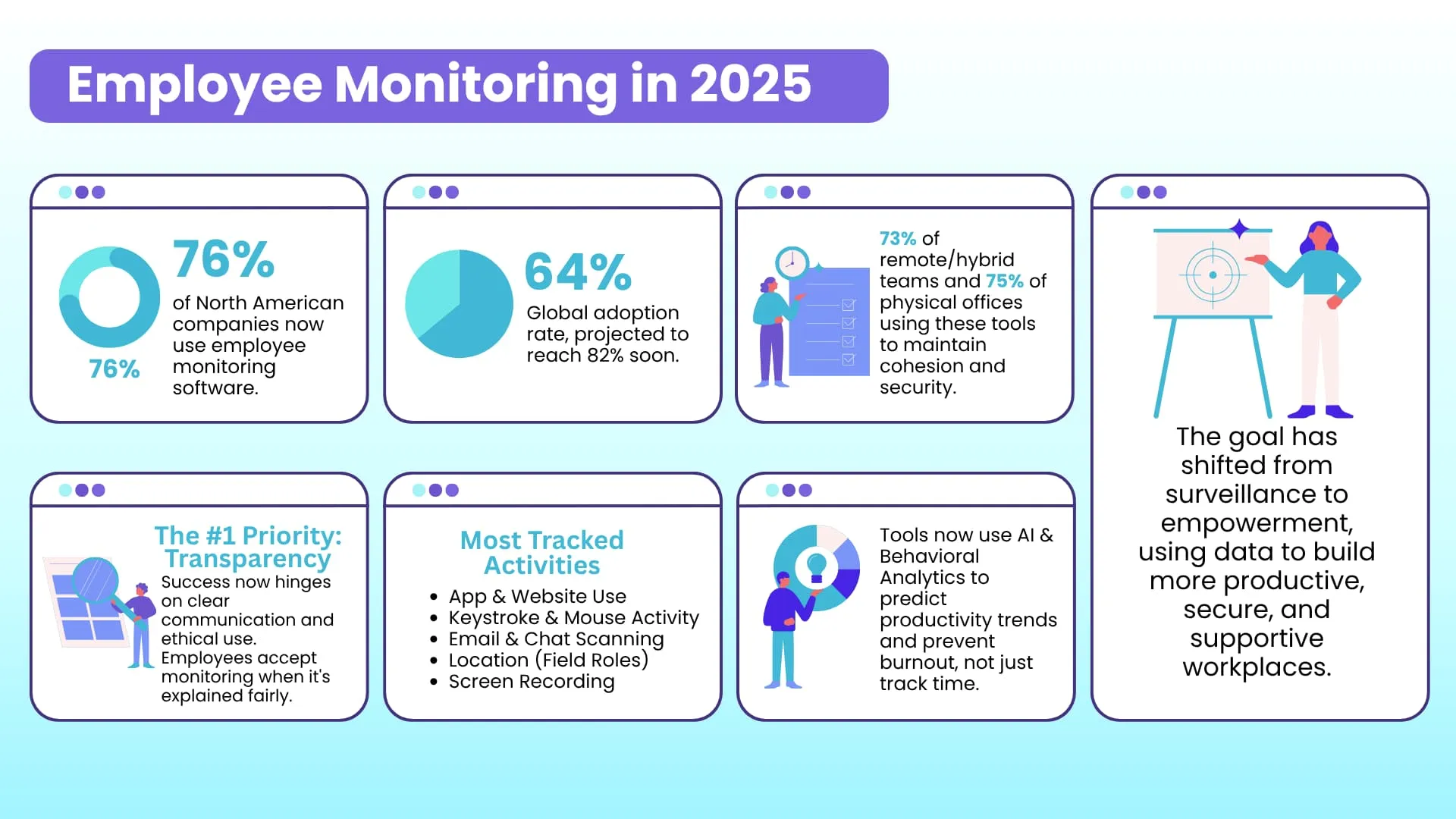
직원 모니터링은 더 이상 틈새 시장이 아니라 주류 비즈니스 도구로 자리 잡았습니다. 최근 데이터에 따르면 북미 기업의 약 76%가 어떤 형태로든 직원 모니터링을 활용하고 있으며, 이는 2020년의 42%에서 크게 증가한 수치입니다. 전 세계적으로는 약 64%의 기업이 직원 모니터링을 도입했으며, 가까운 미래에 82%에 이를 것으로 예상됩니다. 모니터링은 이제 모든 업무 환경에서 보편화되어 원격/하이브리드 팀의 73% 이상, 그리고 실제 사무실의 75% 이상이 팀 결속력과 보안 유지를 위해 이러한 도구를 사용하고 있습니다.
실시간 인사이트와 인공지능의 부상
인공지능(AI)과 머신러닝은 직원 모니터링에 적극적으로 통합되고 있습니다. 최신 시스템은 수동적인 데이터 수집을 넘어 생산성 패턴, 잠재적인 내부자 위협 및 규정 준수 위험에 대한 예측적 통찰력을 제공합니다.
실시간 활동 추적은 핵심 요소이며, 현재 도구의 86%가 관리자에게 애플리케이션 사용량, 작업 전환 및 유휴 시간에 대한 실시간 가시성을 제공합니다.
행동 분석은 인공지능을 활용하여 직원 활동 패턴을 감지하고, 성과 추세와 잠재적 위험을 사전에 파악하여 문제가 심각해지기 전에 해결합니다.
스크린샷 캡처(78%), 채팅 모니터링(40%), 원격 접속(28%)과 같은 자동화 기능은 이제 표준이 되었지만, 이제 초점은 AI가 이러한 데이터를 어떻게 맥락화하여 원시 정보를 실행 가능한 인텔리전스로 전환하는지에 맞춰지고 있습니다. 예를 들어, 메시지에서 플래그가 지정된 콘텐츠를 검색할 수 있습니다.
통찰력과 윤리 및 개인정보 보호 사이의 균형
기술이 더욱 강력해짐에 따라, 그 윤리적 적용에 대한 논의가 당연히 중요해지고 있습니다. 직원들의 개인정보 보호에 대한 인식이 그 어느 때보다 높아짐에 따라, 기업들은 투명성을 강화해야 할 필요성을 느끼고 있습니다.
감시 대상과 그 이유에 대한 투명한 소통은 신뢰를 유지하는 데 매우 중요합니다. 대부분의 직원은 감시 내용이 명확하게 설명되고 공정하게 시행된다면 합리적인 수준의 감시를 수용합니다.
정신 건강에 미치는 영향은 심각하게 받아들여지고 있으며, 연구에 따르면 과도한 감시는 직원 스트레스를 유발할 수 있습니다. 이는 업계가 끊임없는 개인 감시보다는 결과 중심의 분석과 팀 차원의 분석에 초점을 맞춘 균형 잡힌 접근 방식으로 나아가고 있음을 보여줍니다.
윤리적인 모니터링 도구 사용은 이제 최고의 고용주에게 중요한 차별화 요소가 되었으며, 여기에는 명확한 정책, 경계 존중, 그리고 모니터링이 단순히 직원을 감시하는 데 그치지 않고 지원하는 데 활용되도록 하는 것이 포함됩니다.
2025년 가장 많이 모니터링될 활동
모니터링 범위는 주요 디지털 활동을 중심으로 구체화되었습니다.
애플리케이션 및 소프트웨어 사용
키보드 입력 및 마우스 움직임 추적 (특히 규제 산업 분야에서)
웹 브라우징 및 URL 모니터링
이메일 및 메시지 스캔, 특정 콘텐츠를 식별하기 위해 AI를 활용하는 경우가 많습니다.
현장 근무자를 위한 GPS를 통한 위치 추적
활동 확인을 위한 화면 녹화 및 주기적인 스냅샷 촬영
이러한 추세는 세부적인 운영 통찰력과 개인정보 보호 및 윤리적 투명성에 대한 직원들의 높아지는 기대치 사이에서 균형을 맞추는 법을 배우고 있는 성숙한 산업을 반영합니다. 고용주들은 단순히 감독을 위해서가 아니라 더욱 생산적이고 안전하며 지원적인 업무 환경을 조성하기 위해 정교한 AI 기반 솔루션을 점점 더 많이 도입하고 있습니다.
FAQs
How are employers monitoring their employees?
고용주들은 주로 직원 모니터링 소프트웨어를 통해 직원들의 전반적인 업무 성과나 출근 상황을 관리합니다. 최근에는 이러한 솔루션을 직원들에게 동기를 부여하고 보상하며, 생산성을 높이고 의사결정을 지원하는 도구로 활용하는 사례가 늘고 있습니다.
What can employee monitoring software do?
직원 모니터링 소프트웨어는 상당한 발전을 거듭하여 이제는 단순히 근무 시간을 추적하는 것 이상의 다양한 용도로 사용됩니다. 이러한 도구를 통해 기업은 소셜 미디어 및 웹에서 직원을 추적하고, 성과 평가 보고서를 제공하며, 위험 및 부정행위를 감지하는 등 다양한 작업을 수행할 수 있으며, 원격 모니터링도 가능합니다.
Does employee monitoring increase productivity?
직원 모니터링 소프트웨어는 직원들의 업무 습관과 생산성에 대한 통찰력을 제공함으로써 기업이 생산성 향상을 위해 무엇을 해야 하는지 파악하는 데 도움을 줍니다. 적절한 직원 모니터링 소프트웨어는 작업 환경, 업무량, 참여도 등 직원의 생산성에 영향을 미치는 요인을 식별하고 정량화하는 데 유용할 수 있습니다.
How do employees feel about being monitored?
이는 주관적인 질문입니다. 어떤 직원들은 감시받는 것을 개의치 않을 수도 있지만, 어떤 직원들은 사생활이 침해당한다고 느낄 수도 있습니다. 이는 직원들이 고용주와 경영진에 대한 신뢰도, 소속된 업종 등 여러 요인에 따라 달라집니다. 따라서 기업은 목표 달성 과정에서 직원들의 사생활을 침해하지 않도록 필요한 예방 조치(직원 동의 확보)를 취해야 합니다.
How much monitoring of employee activities is appropriate at work?
모니터링 대상 활동의 시기와 빈도에 대해서는 보편적인 합의가 없습니다. 모니터링 관리 방식은 기업 문화, 업종, 기타 요인에 따라 달라집니다. 하지만 은행, 금융 서비스, 의료 등 데이터 처리 및 분석이 많은 업종에서는 직원 전반에 대한 모니터링에 상당한 비중을 두는 경향이 있습니다.
직원 모니터링은 합법적인가요?
일반적으로는 그렇습니다. 하지만 공공 부문이나 사회복지 기관은 직원 모니터링 소프트웨어 사용에 있어 특정 제한을 두는 경우가 많습니다. 또한, 각 주마다 영상 감시, 데이터 수집 등과 관련된 법률 및 규정이 다를 수 있습니다. 따라서 고용주는 해당 주의 개인정보 보호법을 준수하여 잠재적인 데이터 유출 및 정보 오용을 방지하기 위한 적절한 안전장치를 마련해야 합니다.
Do employers have to notify employees of monitoring?
직원 모니터링 솔루션이 도입되었거나 도입될 예정이라면 즉시 직원들에게 알리는 것이 가장 좋은 방법입니다. 이렇게 하면 직원들은 고용주가 어떤 내용을 어떤 방식으로 모니터링하는지 알 수 있으며, 우려 사항이 있을 경우 의견을 제시할 수 있습니다.
Is it legal to monitor employees without their knowledge?
이것의 합법성은 해당 주의 개인정보 보호법에 따라 다릅니다. 일부 주에서는 특정 요건을 충족하는 경우 이를 허용합니다. 하지만 이 경우에도 직원은 고용주가 자신의 활동을 모니터링하는 것에 동의해야 하며, 고용주는 데이터 오용을 방지하기 위해 모니터링 대상, 사용 방법 등을 개인정보 보호 정책에 명시해야 합니다.
Can employee monitoring be done ethically?
직원 모니터링 소프트웨어의 윤리적 사용은 관련 디지털 자산을 개인 정보 및 기밀로 취급하는 데 달려 있습니다. 고용주는 데이터 유출 및 법적 문제 발생 시 관련 법률을 준수해야 합니다. 또한, 고용주는 개인정보 처리방침에 직원의 디지털 자산 중 어떤 부분을 모니터링할지 명확히 명시하고, 모니터링 전에 직원의 동의를 얻는 것이 필수적입니다. 이와 관련하여 고용주는 직원 모니터링 소프트웨어 도입 전에 법률 자문을 구하는 것이 좋습니다.
Is it legal to monitor employee emails?
이메일은 일상적인 업무 흐름에서 필수적인 부분이며, 따라서 자주 모니터링됩니다. 많은 고용주들은 기업 정책을 위반하거나 사업에 중요한 메시지가 있는지 확인하기 위해 직원 모니터링 소프트웨어를 사용합니다. 그러나 오늘날 이메일 개인정보 보호를 규정하는 수많은 법률과 규정을 고려할 때, 고용주는 필요한 법적 예방 조치를 취하고 직원 이메일을 모니터링할 권리가 있는지 확인하는 것이 매우 중요합니다.
Why is employee monitoring important?
오늘날 디지털 시대에 기업이 경쟁력을 유지하려면 직원 모니터링은 필수적입니다. 이를 통해 고용주와 직원은 성과를 모니터링하고 생산성 향상, 이직률 및 결근 감소 등에 기여하는 요인을 파악하여 개선할 수 있습니다. 또한 고용주는 직원 데이터를 수집 및 분석하여 직원들의 요구를 더 잘 이해하고 변화하는 환경에 적응함으로써 사업을 육성하고 성장시킬 수 있습니다.
Why it's important to use monitoring software for the whole office?
직원 모니터링 소프트웨어는 직원의 행동 패턴을 추적하고 분석하는 데 사용될 수 있으며, 이는 모든 비즈니스에 매우 중요합니다. 이러한 패턴 분석은 향후 인사 정책 수립, 근무 시간 조정, 교육 요구 사항 설정 등에 활용될 수 있습니다. 예를 들어, 근무 시간 중 개인 이메일 계정이나 온라인 쇼핑몰을 확인하는 직원이 늘어나는 추세라면 생산성 향상을 위해 사용을 제한하는 것이 좋은데, 직원 모니터링 소프트웨어에서 제공하는 시각화 자료가 매우 유용할 수 있습니다.