
How to Train Managers to Effectively Use Employee Monitoring Software

Author: Maria Kislitsyna
Employee monitoring software is just a tool. It doesn’t improve productivity or solve problems on its own; it only provides data on how the workflow is progressing. What makes the software valuable is how managers use this data - as an insight or a micromanagement tool.
To get the most out of the software, managers need more than just a quick demo of the main functionality and the monitoring dashboard layout. They need structure, boundaries, and good judgment.
That is why businesses should not just invest in employee monitoring software - they should invest in training their managers to interpret its reports as well.
Why manager training matters so much
Many companies assume that once software is installed, managers will naturally know how to use it well. However, effectively interpreting monitoring data requires more than skimming through logs and charts.
Without training, managers tend to either ignore the monitoring data because they are unsure what to do with it or overuse it and start monitoring too closely. Neither approach is helpful, of course.
Well-designed training helps managers understand that employee monitoring software is there to support better leadership:
- spot workflow bottlenecks
- identify unusual changes in work patterns
- support remote and hybrid employees more effectively
- make performance conversations more fact-based
- notice potential overload or burnout risks earlier
Without training, managers risk falling into the trap of micromanagement, damaging employee trust, putting the team under unnecessary pressure, and making wrong decisions.
So, how to organize training?
Start with purpose, not dashboards
The first step in manager training should not be a tour of features. It should be a conversation about the purpose of monitoring. That purpose should be specific, for example:
- improving visibility in remote or hybrid teams
- identifying inefficiencies in workflows
- supporting productivity coaching
- protecting company data
- strengthening compliance and accountability
Without understanding why monitoring exists, managers focus on activity for its own sake. They check screenshots, app usage, and visited pages, and reprimand employees for each minute of inactivity or a brief visit to Facebook.
Training should make one thing clear: monitoring is not about watching people constantly. It is about understanding patterns that can help the business and support employees.
This is also the point where companies should explain their internal policy. Managers should know:
- what data is collected
- why it is collected
- how it can be used
- who has access to it
- what boundaries they must respect
That clarity helps prevent inconsistent use across teams. It also makes manager decisions easier to defend and easier for employees to trust.
Teach the software through real use cases
Managers do need technical training, of course. But the most effective training is practical rather than feature-heavy. Managers might not need to learn every button and report, but they definitely need to master the features they will use in real daily situations. These can be:
- productivity summaries to review long-term trends
- app and website usage reports to understand work patterns
- attendance or time data to spot irregularities
- screenshots or recordings for investigating specific concerns
- alerts for unusual behavior that may require follow-up
Training should not be limited to the technical side only; it should explain in what cases each feature works best and where it shouldn’t be used.
A manager should know, for instance, that screenshots might be useful in a specific investigation but are a poor substitute for performance management. They should know that high activity is not the same as high value, and that not every dip in visible activity signals a problem.
This is where role-based training helps. Different managers need different views of the software. A team leader in customer support may rely on activity trends and scheduling data. A department head may focus more on broad productivity patterns and workload distribution. A one-size-fits-all training session usually leaves everyone with too much irrelevant detail and not enough practical guidance.

Train managers to interpret data in context
This is the most important lesson of all: employee monitoring software produces signals, not complete answers.
A manager who treats raw data as final proof is very likely to misread what is happening.
For example:
- Long hours may signal dedication, but they may also signal overload
- Time in a non-core app may look unproductive, but it may be part of the role
- Lower keyboard activity may suggest disengagement, or it may reflect deep, focused work
- A sudden change in routine may indicate a problem, or simply a project shift
That is why managers should be trained to look for patterns over time, not isolated moments. They should also be taught to combine software data with other sources of context, such as:
- role expectations
- deadlines
- quality of output
- employee feedback
- team communication
- business results
A good rule to include in training is this: data should trigger questions before it triggers judgments.
Ethics and transparency must be core concepts of monitoring
Managers must be taught how to use employee monitoring software fairly. That includes both legal and cultural expectations. Even when monitoring is allowed, overuse can quickly damage morale.
A strong training program should reinforce a few principles:
- monitor for legitimate business reasons only
- be transparent with employees about monitoring practices
- do not react to every minor deviation
- avoid using monitoring data as a shortcut for distrust
- remember that the software provides visibility, not understanding
Monitoring data is best used for coaching, not punishment
Monitoring data should be the foundation for better conversations with employees, not faster accusations.
That is the mindset companies should build into training. If a manager notices a change in work patterns, the first response should be curiosity. Is the employee stuck? Distracted? Overloaded? Dealing with a broken process? Taking on hidden work that the manager was unaware of?
Done right, employee monitoring software can support coaching in very practical ways. It can help managers:
- identify blockers early
- spot signs of overwork
- notice inconsistent workflows
- support employees who may be struggling silently
- make one-on-one conversations more specific and constructive
Managers need to master both the technical side of monitoring and interpersonal skills. Monitoring data is only helpful when it leads to better support, clearer feedback, and smarter decisions.
Use scenario-based training
One of the best ways to train managers is to stop teaching only in theory.
Realistic scenarios help them practice judgment before they are in a live situation. Here are some good examples:
- A usually reliable employee shows a sudden drop in activity for three days
- One team member spends much longer than others on non-core websites
- An employee appears active for unusually long hours over several weeks
- A remote team shows uneven activity patterns after a workflow change
In each case, the training should not focus only on what the manager sees. It should focus on how the manager responds.
The right questions are:
- What else should the manager check before drawing conclusions?
- Is this a coaching issue, a workload issue, or a conduct issue?
- Does the pattern require action now, or more observation first?
Scenario-based practice helps managers become more consistent, which is essential if the company wants employee monitoring software to support fair decision-making.
What managers should avoid
Here are the habits that training should actively discourage:
- checking employee activity constantly throughout the day
- equating busyness with performance
- reacting strongly to one-off incidents
- using screenshots as a routine management method
- comparing employees without considering role differences
- relying on monitoring data instead of direct communication
Instead of making a manager more effective, such behaviours make them more reactive and cause anxiety and stress in the team.
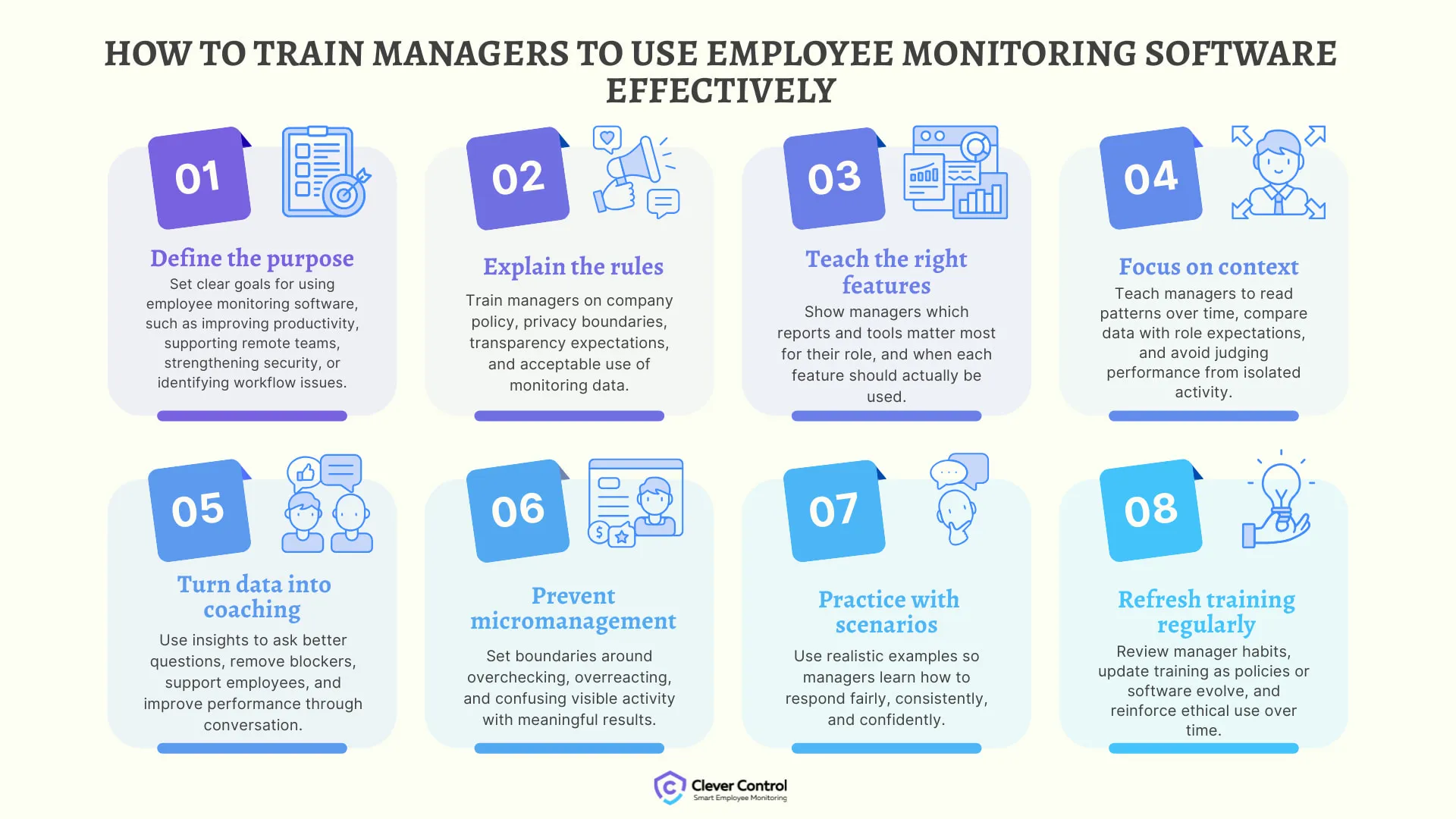
How to train managers to use employee monitoring software effectively
Summing up, here is a simple training framework companies can use:
Conclusion
To use employee monitoring software effectively, managers should not only know how to view the activity report but also how to interpret and use it ethically to improve workflows, support employees, and make better decisions. Otherwise, even the best software can be misused.
Solutions like CleverControl can provide valuable visibility into how work happens across office, remote, and hybrid teams. But the real value appears when that visibility is paired with clear goals, fair policies, and managers who know how to lead with context rather than control.