
Často kladené otázky
Monitorování zaměstnanců: Obecné otázky
Employee monitoring software allows organizations to track work hours and analyze how employees use their work time and company devices. Such software usually monitors the start and end of the work day, idle time, computer activity, application and website usage, communication, and in some cases, location. Companies use employee monitoring software to evaluate productivity, enhance security, protect data, and ensure compliance with company policies.
Typically, employee monitoring software is a small program (sometimes called an agent) that employers install on employees' computers or devices. This agent works in the background and collects data on various activities. The collected data is then transmitted to a central server or dashboard, where authorized personnel, such as managers and administrators, can view and analyze it.
When implemented transparently and with ethical considerations, employee monitoring is a powerful tool for increasing productivity. It provides insights into work processes, helps detect inefficiencies, and encourages data-driven measures to improve the situation. Besides, the awareness of being monitored can encourage employees to stay focused and on task.
When choosing employee monitoring software, consider features that align with your needs, such as tracking work hours, improving productivity, or maintaining security. Valuable features are:
- time tracking;
- website and application usage monitoring;
- idle time detection;
- screenshots/screen recording;
- reporting and analytics;
- alerts and notifications;
- online monitoring dashboard;
- integrations.
Employee monitoring is important because it contributes to a more secure, efficient, compliant, and productive work environment. It provides employers with valuable insights into how work time is spent, helping to:
- highlighting inefficient work processes;
- improving productivity;
- increasing security;
- ensuring compliance with company policies and legal requirements;
- optimizing resources
- supporting performance evaluations.
When implemented thoughtfully and transparently, employee monitoring leads to several positive outcomes for both the organization and the employees. It is a powerful tool to improve workflow efficiency and productivity. It can encourage employees to be responsible for their work hours, identify training needs, and help managers recognize and reward performance. Besides, employee monitoring helps protect the company against data breaches, cyber threats, and inappropriate behavior, creating a safer work environment for everyone.
The main benefits of employee monitoring are better performance and productivity, enhanced data security, lower risks or insider threats, improved accountability, better resource management and allocation, and informed decision-making.
On the other hand, monitoring can potentially decrease employee morale, undermine trust, create unwanted stress and pressure, and negatively affect the company culture. Besides, if tracking is implemented without considering applicable regulations, it can raise legal and ethical concerns.
Employers typically state they track and monitor employee behaviors to improve productivity, enhance security and protect sensitive data, ensure compliance with internal policies and external regulations, prevent time theft, and gain insights into work patterns for better resource management and performance evaluation.
The primary business reasons for employee monitoring include safeguarding company assets and intellectual property, minimizing legal liabilities through compliance and record-keeping, and optimizing workflows. Besides, employee monitoring is a valuable data source to back decisions aimed at improving overall business performance and profitability.
These risks include potentially damaging employee trust and morale, increasing stress and anxiety among the workforce, facing legal challenges related to privacy violations, misinterpreting data which could lead to unfair treatment, and potentially stifling creativity and innovation due to constant surveillance.
Critics fear that employee monitoring programs can lead to a surveillance-heavy work culture that erodes privacy, reduces autonomy, increases job-related stress and burnout, creates an imbalanced power dynamic between employers and employees, and could be used to discriminate against certain workers or suppress legitimate workplace organizing.
The legality of employee monitoring depends on the location. Generally, it is legal in many jurisdictions, including the USA, Europe, and India. However, the scope of activities the employer can monitor may vary depending on the applicable state and local regulations. Besides, organizations are often obliged to notify the staff about the monitoring.
Generally, employers are allowed to track computer and internet usage on company equipment, monitor work-related communications through company email and messaging systems, and use video surveillance in common work areas. Monitoring of personal devices, private communications, or private areas like restrooms is typically restricted or prohibited.
Identifying a single "weakest" employee monitoring law is difficult. Legal frameworks differ significantly across jurisdictions: some deliver minimal employee privacy protections, while others have stricter notification and consent requirements. Generally, areas with fewer specific statutes addressing electronic monitoring and workplace privacy may offer less protection to employees.
Employees can check for monitoring software by looking for unfamiliar processes running in their computer's Task Manager or system monitor, analyzing network activity for unusual data transfers, and using security programs.
There are several signs that the employer may be monitoring the computer: unusual computer behavior, such as slow performance, strange pop-ups or errors, suspicious processes in the Task Manager or Activity Monitor (on macOS), or increased network activity. If employees notice these signs, they can check installed apps for unfamiliar names, use antivirus or security software, or consult the IT or HR specialist in their organization.
On macOS, employees can open Activity Monitor to view running processes and identify unfamiliar or suspicious applications. One can also examine login items and launch agents that start automatically, review network utility for unusual connections, and check System Settings/Preferences for installed profiles that might indicate device management or monitoring.
Attempting to block employee monitoring software on a company-owned device is generally not advisable. It may violate company policy, potentially leading to disciplinary action, including termination. Technical methods to impede monitoring, such as using virtual machines, attempting to disable processes, or using tools to mimic activity, may be detectable by the employer and could have serious consequences. It is best to understand and comply with your company's monitoring policies.
Často kladené otázky k softwaru CleverControl
CleverControl je cloudový software, takže všechna data zaznamenaná agentem CleverControl nainstalovaným na počítačích vašich zaměstnanců jsou uložena na vzdáleném zabezpečeném serveru. A pro přístup k datům je třeba zaregistrovat účet, abyste mohli bezpečně prohlížet informace na vzdáleném serveru.
CleverControl je kompatibilní s operačními systémy Windows a OS X, takže jej můžete nainstalovat na jakýkoli notebook nebo stolní počítač s jakoukoli verzí systému Windows včetně nejnovější verze Microsoft Windows 10 nebo na jakýkoli systém OS X od verze 10.13 High Sierra a vyšší.
Domníváme se, že je pro vás výhodnější, když si před instalací programu CleverControl Agent vytvoříte účet. Protože k dokončení procesu instalace budete muset zadat údaje o svém účtu, abyste mohli navázat spojení s cloudovým serverem. Pokud tedy účet nemáte, budete vyzváni k jeho vytvoření.
CleverControl is intended for lawful employee monitoring on company-owned devices and should be used with proper authorization, employee notification, and internal policies. Employers are responsible for informing employees about monitoring and configuring the software according to applicable laws and workplace privacy requirements. Employees can get access to the collected data via the Self-Monitoring feature.
Yes. CleverControl Agent can record configured work-related activity on authorized company devices, according to the organization's monitoring policy and applicable law. Reports may include application usage, website activity, screenshots, and other enabled features, where legally permitted and properly disclosed.
Yes. CleverControl can record configured website activity on authorized company devices. Depending on the settings, applicable laws, and the company's internal policies, authorized managers may review visited websites and related screenshots.
Ano, blokování webových stránek je jednou z funkcí programu CleverControl Agent. Můžete blokovat určité webové stránky nebo celé kategorie, například všechny sociální sítě. To můžete provést ve "Vzdáleném nastavení" ve svém účtu.
Chcete-li zobrazit data z programu CleverControl Agent, musíte se přihlásit ke svému vzdálenému účtu na ovládacím panelu: https://dashboard.clevercontrol.com/ . K přihlášení můžete použít libovolný webový prohlížeč na libovolném zařízení.
V současné době je k instalaci programu nutný přístup k počítači s právy správce. Proces instalace však zabere jen několik okamžiků.
Všechna nastavení lze změnit a použít na dálku v účtu na ovládacím panelu. Přejděte na kartu "Vzdálená nastavení", změňte nastavení a klikněte na "Použít na tomto počítači" nebo "Použít na všech počítačích".
Podmínky ukládání se liší v závislosti na typu dat a jsou následující: Záznam obrazovky, záznam webové kamery a záznam hovoru - jeden měsíc. Poté se data automaticky odstraní bez možnosti obnovení. Pokud si chcete protokol událostí a snímky obrazovky ponechat i po uplynutí této doby, můžete data exportovat pomocí funkce Zprávy.
Important: Automatic start scheduling should be configured only on authorized company devices and according to the organization's written monitoring policy, working-hours rules, and applicable law. Monitored users must be informed in advance, and consent must be obtained where required.
CleverControl se ve výchozím nastavení spustí při zapnutí počítače. Někdy můžete potřebovat, aby se místo toho spustil v naplánovanou denní dobu. Automatické spuštění programu CleverControl nelze naplánovat prostřednictvím nastavení v aktuální verzi programu. Můžete to však provést pomocí Plánovače úloh systému Windows.
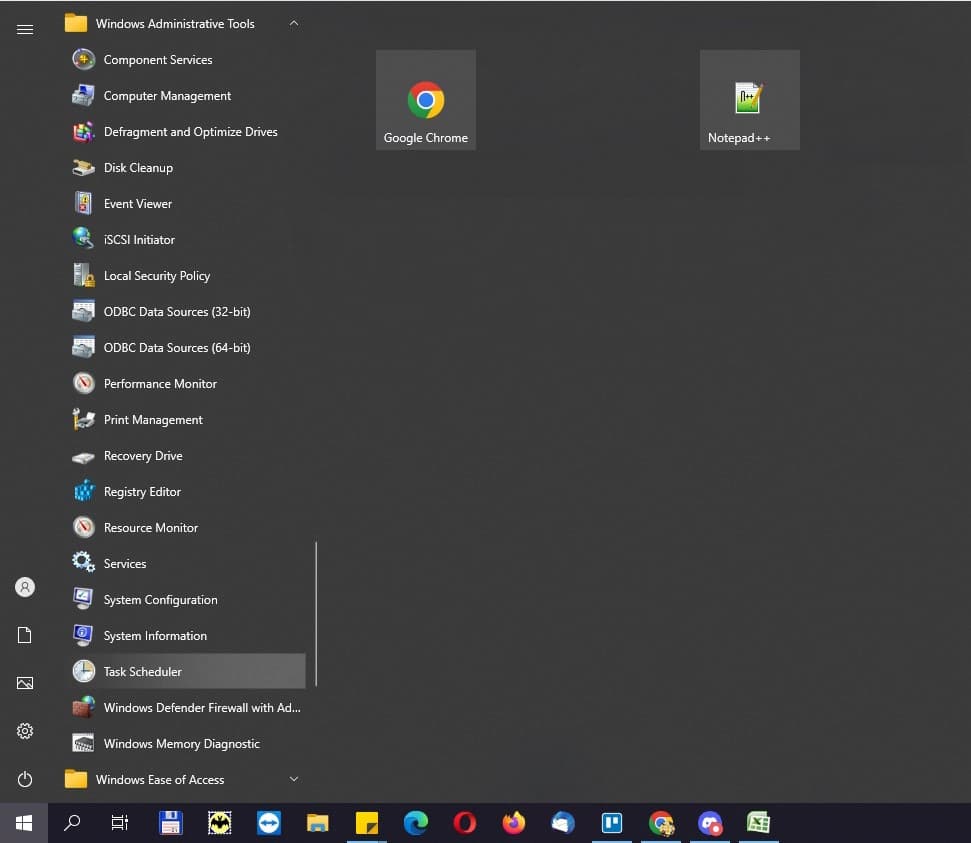
Klikněte na ikonu Windows na hlavním panelu. Přejděte dolů v seznamu programů a najděte Nástroje pro správu systému Windows. Kliknutím na složku ji rozbalte a kliknutím na Plánovač úloh jej spusťte.
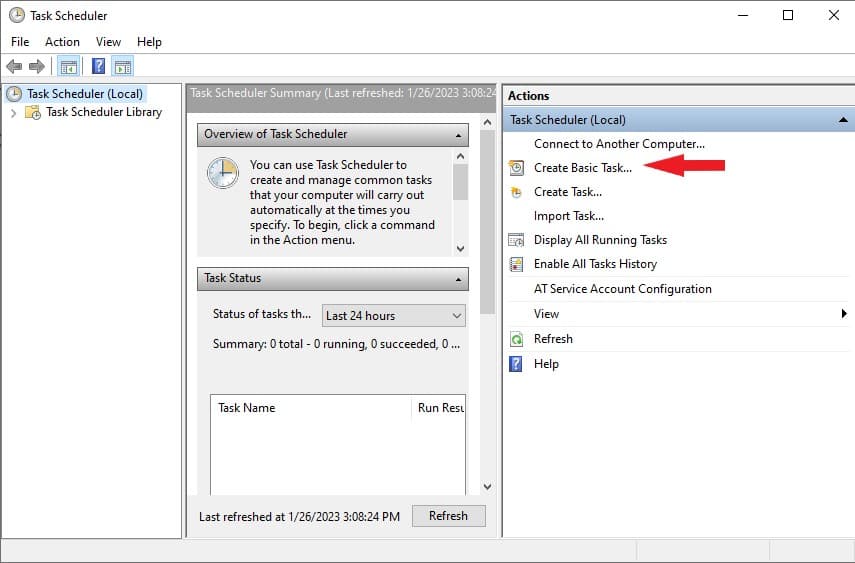
Klikněte na Vytvořit základní úlohu.
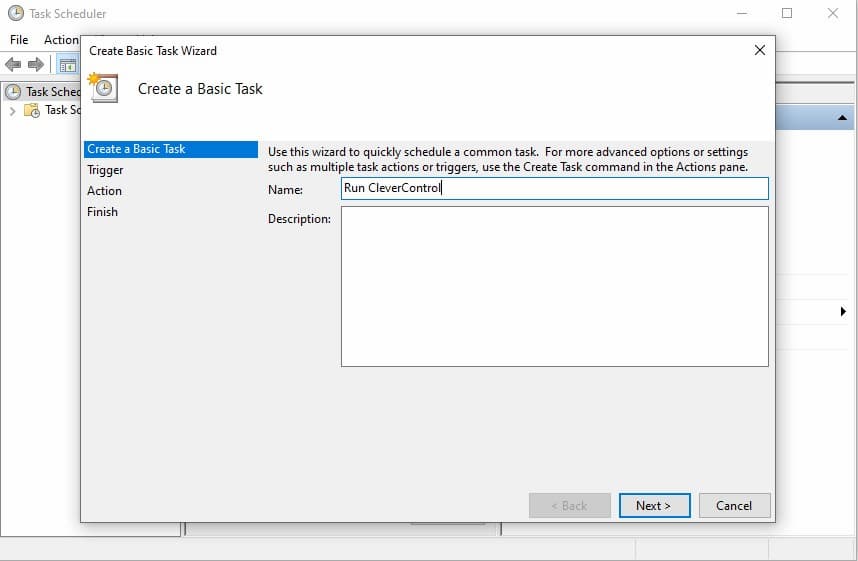
Zadejte název úlohy, například "Spustit CleverControl". Přidejte popis (nepovinné). Poté klikněte na tlačítko Další.
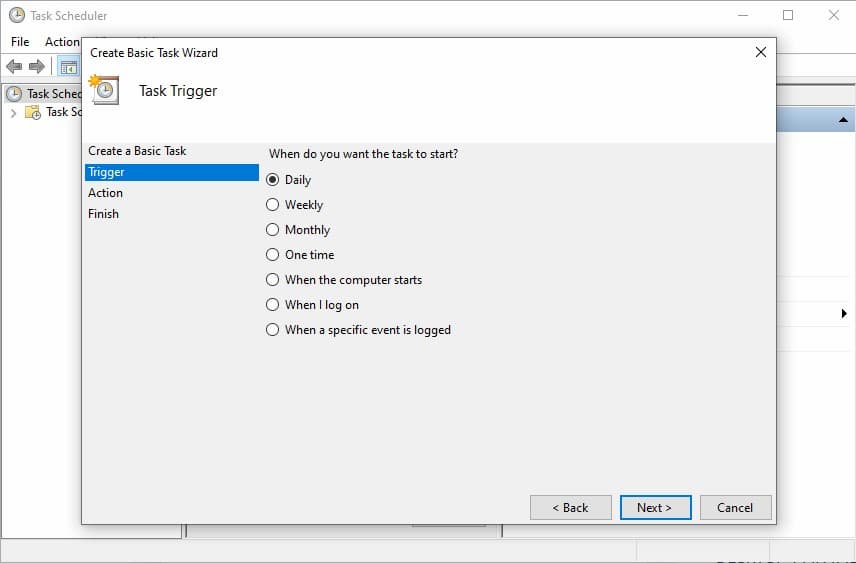
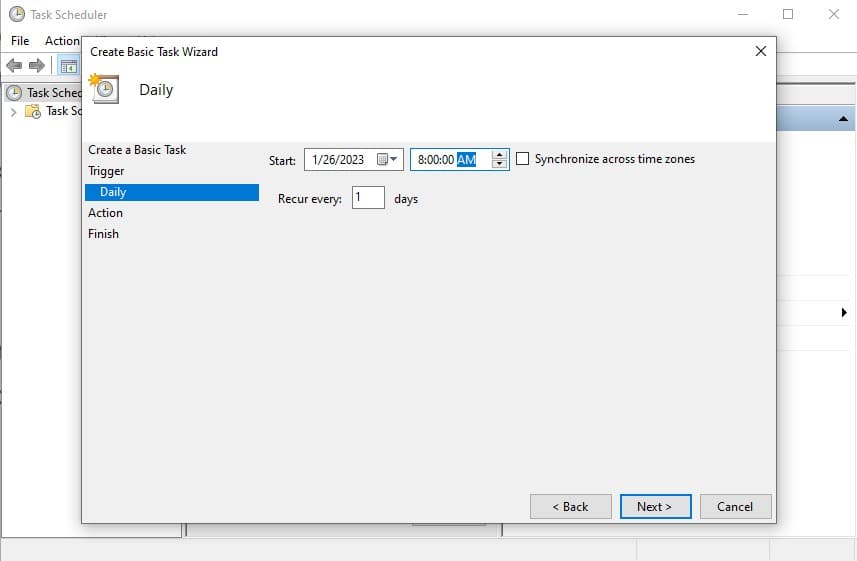
Vyberte Denní a klikněte na Další.
Nastavte čas, kdy se má CleverControl spustit, například 8:00:00. Klikněte na Další a pokračujte.
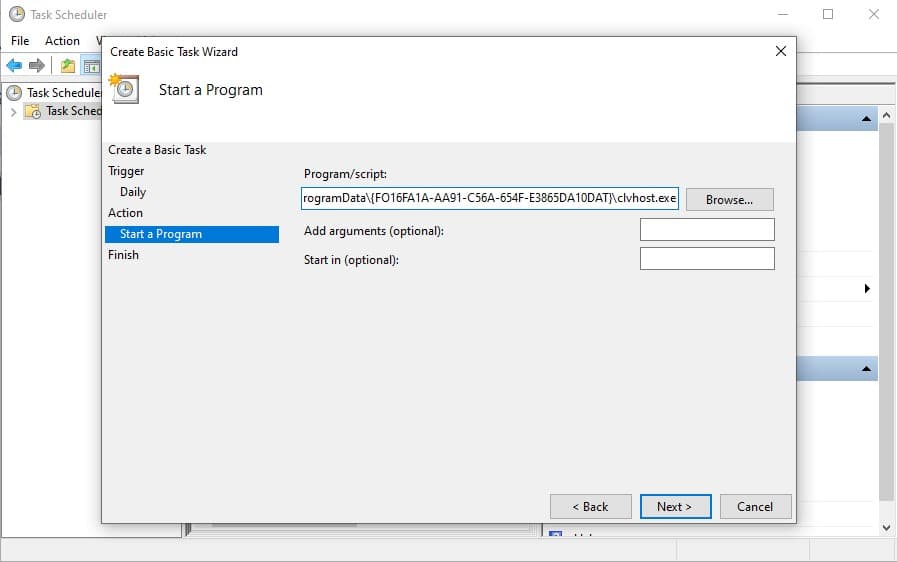
Copy and paste the path: C:\ProgramData\FO16FA1A-AA91-C56A-654F-E3865DA10DAT\clvhost.exe to the Program/Script field. Click Next.
Klikněte na tlačítko Dokončit.
Important: Automatic stop scheduling can help align monitoring with working hours and internal policy requirements. Organizations should configure monitoring schedules according to their written monitoring policy, notify monitored users in advance, and obtain consent where required by law.
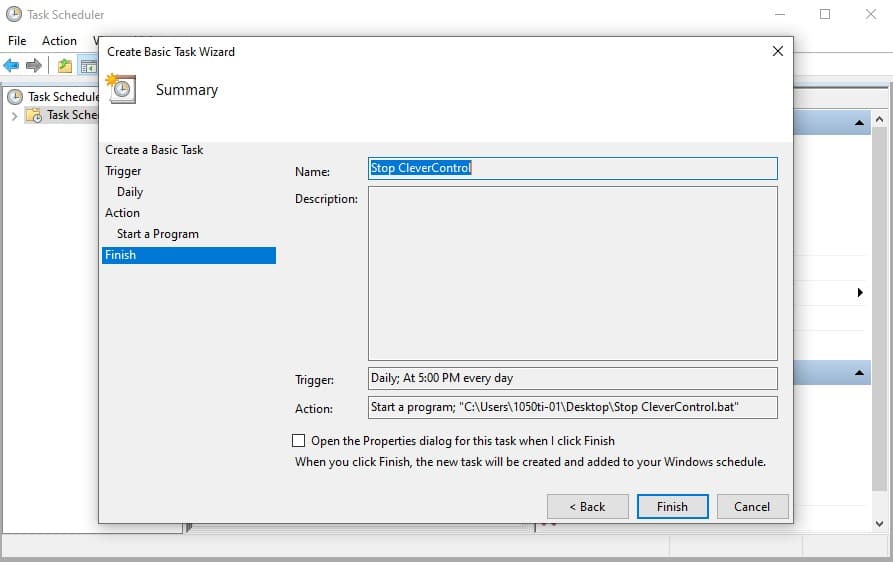
Ve výchozím nastavení je CleverControl spuštěn po celou dobu, kdy je sledovaný počítač zapnutý. Pokud však používáte osobní počítač k práci, chtěli byste, aby se monitorování ukončilo po skončení pracovního dne. Prostřednictvím nastavení v aktuální verzi programu není možné naplánovat automatické ukončení programu CleverControl. Můžete to však provést pomocí Plánovače úloh systému Windows.
Nejprve byste měli vytvořit dávkový skript, který program spustí a zavře. Otevřete Poznámkový blok a zadejte následující příkaz: TASKKILL /F /IM clvhost.exe.
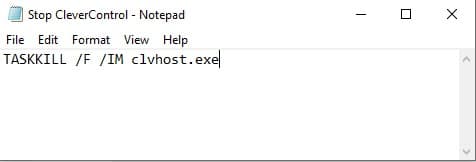
Uložte soubor s příponou .bat, například "Stop CleverControl.bat".
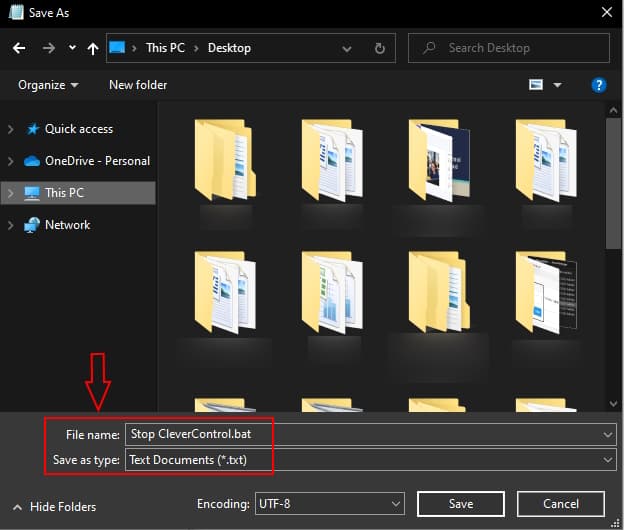
Poté byste měli naplánovat úlohu pro zastavení programu CleverControl. Klepněte na ikonu Windows na hlavním panelu. Přejděte dolů v seznamu programů a najděte Nástroje pro správu systému Windows. Klepnutím na složku ji rozbalte a klepnutím na Plánovač úloh ji spusťte.
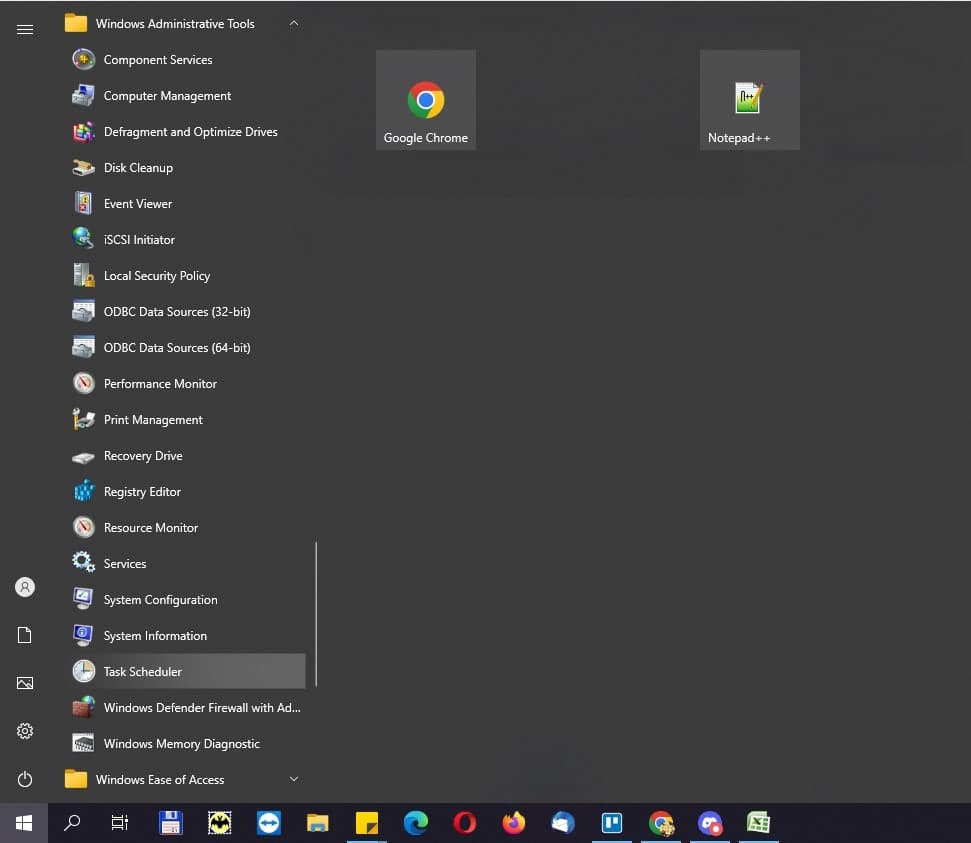
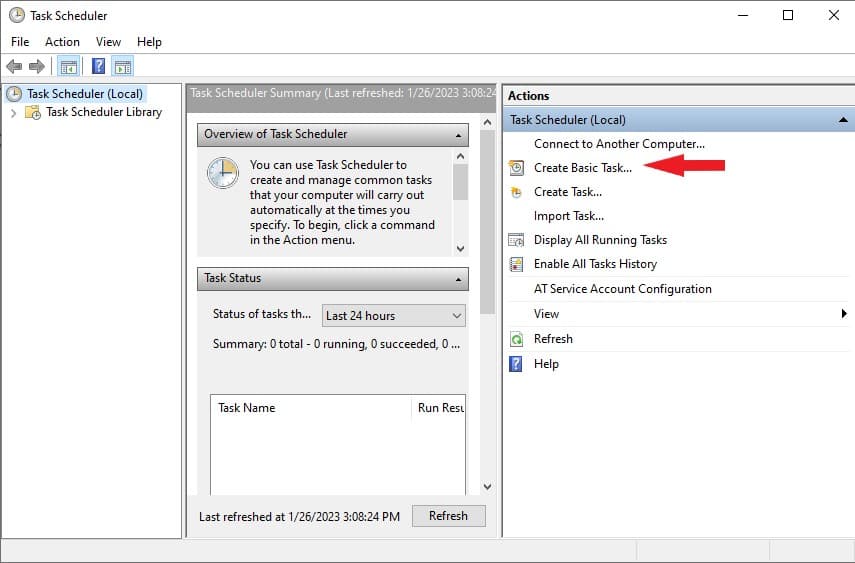
Klikněte na Vytvořit základní úlohu.
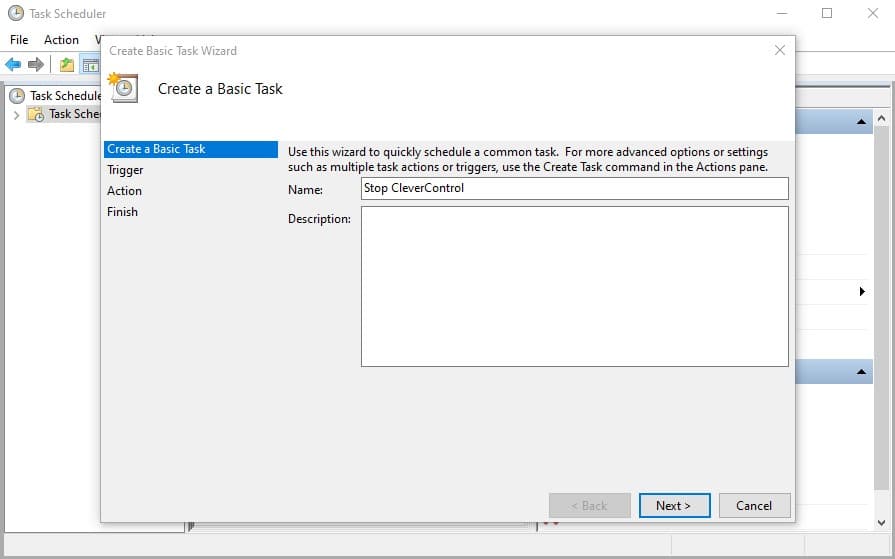
Zadejte název úlohy, například "Stop CleverControl". Přidejte popis (nepovinné). Poté klikněte na tlačítko Další.
Zvolte Denní a klikněte na Další.
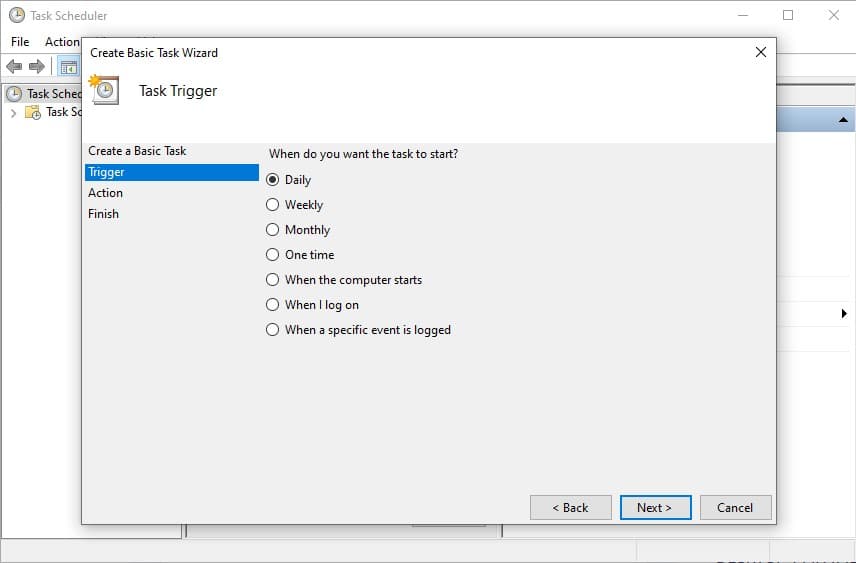
Zvolte čas, kdy se má CleverControl spustit, například 17:00:00. Klepnutím na Další pokračujte.
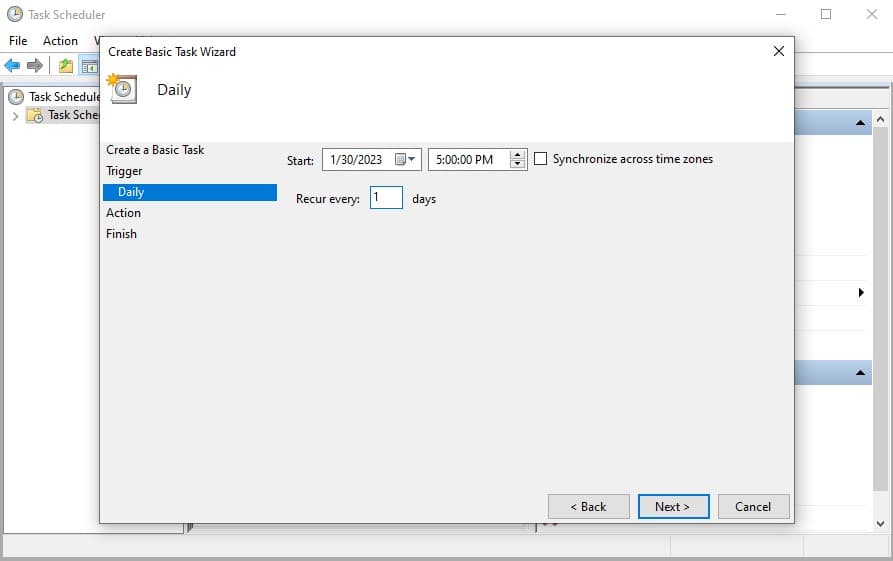
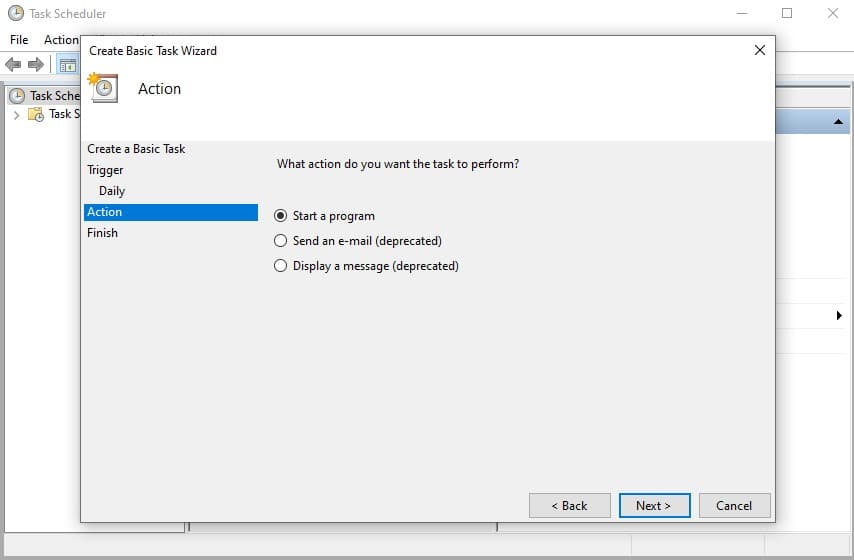
Vyberte možnost Spustit program a klikněte na tlačítko Další.
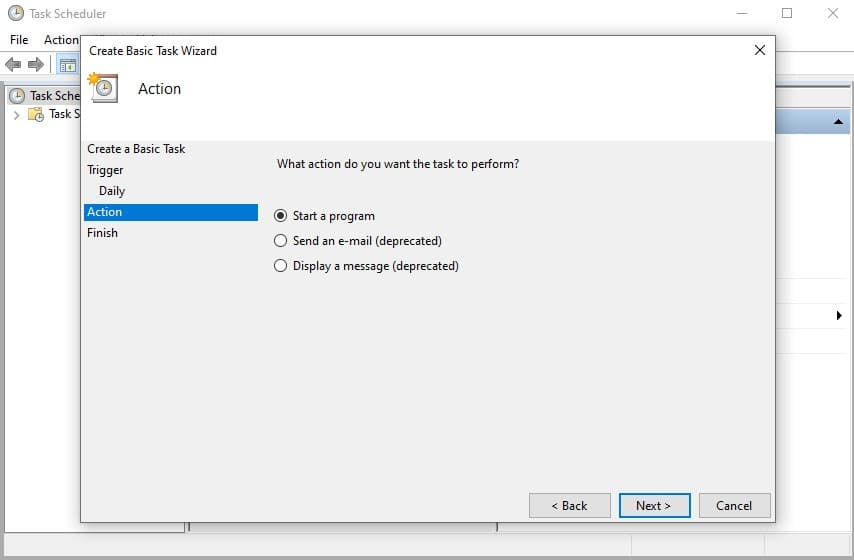
Klikněte na Prohlížet a najděte soubor "Stop CleverControl.bat", který jste právě vytvořili a uložili. Klikněte na Další.
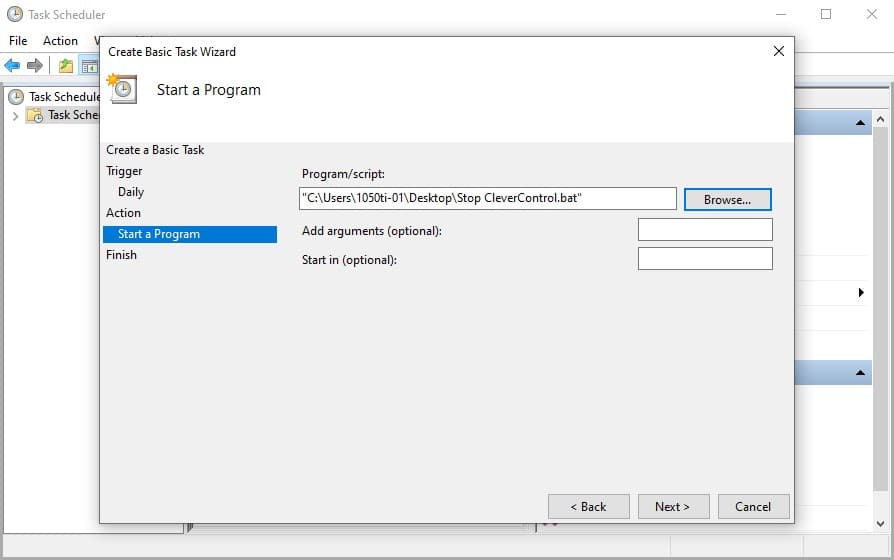
Klikněte na tlačítko Dokončit.
Rozpoznávání obličeje není součástí základního předplatného. Chcete-li jej začít používat, měli byste si zakoupit doplněk Záznam webové kamery. Pokud jej již máte, měli byste program ve sledovaných počítačích aktualizovat na nejnovější verzi.
Poté podle následujících kroků aktivujte funkci Rozpoznávání obličeje:
1) Přejděte na svůj online řídicí panel > Účet > Počítače a zkontrolujte, zda je zapnuto nahrávání webové kamery.
2) Klikněte na tlačítko Nastavení počítače pod názvem počítače.
3) Přejděte na kartu Média a přejděte dolů do části Rozpoznávání obličeje. Přepněte na možnost Rozpoznávání obličeje a v rozevírací nabídce vyberte webovou kameru. Vše je připraveno!
Později najdete zprávu na kartě Rozpoznávání obličeje na ovládacím panelu.
Doživotní licence zahrnuje všechny základní funkce softwaru CleverControl: snímky obrazovky, sledování navštívených webových stránek, monitorování aktivity tiskáren atd. Získáte také přístup ke všem dalším funkcím: Nahrávání obrazovky, nahrávání webové kamery + rozpoznávání obličeje a nahrávání hovorů.
Ano, jsou k dispozici s doživotní licencí.
Ne. doživotní licence je k dispozici pouze pro CleverControl On-Premise.
Všechny aktualizace verzí iniciované společností CleverControl jsou navždy zdarma.
Ne, technická podpora je navždy zdarma. Náš tým podpory můžete kontaktovat v případě jakýchkoli dotazů týkajících se produktu 24 hodin denně, 7 dní v týdnu na adrese support'@'clevercontrol.com.